This site uses cookies to enhance your user experience. By clicking any link on this site you are giving your consent to our cookie policy. Read more
Reject
Accept All

Advertiser and Editorial Disclosures

Allstate Mobile

Allstate Mobile

verified

The Allstate Corporation

4.1
Rating
10,000,000+ Downloads
21.2.0 Version
  • category

    Category: Finance

  • price

    Price: free

  • age rating

    Age Rating: Everyone

  • rating

    Rating: 4.1

  • available on

    Available on: /

  • updated on

    Updated on: Jun 30, 2026

Screenshot 1
Screenshot 2
Screenshot 3
Screenshot 4
Screenshot 5
Screenshot 6
Screenshot 7
Advertisement

Features & Highlights

Easy Policy Management

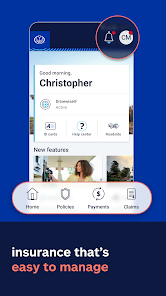
Allstate Mobile simplifies the process of managing your insurance policies. With just a few taps, you can view your coverage details, make payments, and even update your information, ensuring you're always in control of your financial security.

Instant Claim Filing

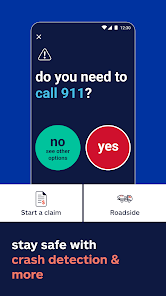
Filing a claim has never been easier with Allstate Mobile. You can quickly report accidents, upload photos, and track the status of your claim in real time, making the often stressful process as smooth as possible.

Personalized Insurance Insights

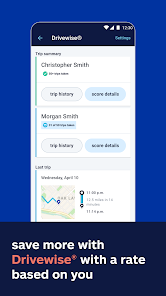
Stay informed about your insurance with personalized insights tailored to your needs. The app provides helpful recommendations and tips based on your driving habits, allowing you to make smarter choices and potentially save on your premiums.

Roadside Assistance Access

Need help on the road? Allstate Mobile offers quick access to roadside assistance services right from the app. Whether you need a tow, battery jump, or a tire change, help is just a tap away, providing peace of mind during your travels.

Advertisement

Pros & Cons

Pros
  • Access your policy anytime, anywhere with ease.
  • Instant claims processing for quick resolution.
  • Manage payments securely and effortlessly.
  • Get personalized assistance through in-app support.
  • Stay informed with real-time alerts and updates.
Cons
  • Limited functionality compared to desktop version
  • Frequent app crashes reported by users
  • Complicated navigation can frustrate users
  • Slow customer service response times noted

Real Experience Using Allstate Mobile

Application Scenarios

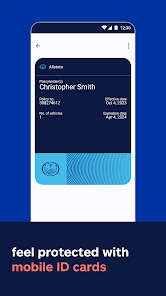
The Allstate Mobile app serves a variety of practical scenarios for users seeking to manage their insurance needs efficiently. One of the primary applications is policy management; users can access policy details, make payments, and view coverage options directly from their smartphones. This convenience is particularly beneficial for those who may need to provide proof of insurance while on the road. Additionally, the app includes a feature that allows users to file claims with ease, guiding them through the necessary steps to ensure a smooth process. Whether you’re dealing with a minor incident or a more serious accident, the app simplifies the claims process significantly. Users can also utilize the app's roadside assistance feature, which connects them to help in case of car troubles, making it an essential tool for drivers.

User Experience

The user experience of the Allstate Mobile app is generally positive, marked by an intuitive interface that makes navigation straightforward. Upon logging in, users are greeted with a dashboard that highlights their policies and key features. The layout is clean and user-friendly, allowing even the less tech-savvy individuals to find what they need without frustration. Many users appreciate the app’s ability to store multiple policies under one account, which is especially advantageous for families or individuals with various insurance needs. However, some users have reported occasional bugs or slow loading times, particularly during peak hours, which can detract from the overall experience. The app does, however, provide valuable resources, such as safety tips and vehicle maintenance reminders, enhancing the overall functionality.

Pricing

The Allstate Mobile app is free to download and use for all customers with Allstate insurance policies. There are no additional costs associated with using the app itself, making it an attractive option for users looking to manage their insurance without incurring extra fees. However, it’s important to note that users will still need to pay for their individual insurance premiums, which can vary based on the coverage chosen. Allstate also offers various discounts that users can explore through the app, which can help reduce overall insurance costs, making it a financially savvy choice for existing and potential customers.

Updates & Support

Allstate is committed to continually improving the user experience by regularly updating the app with new features and enhancements. Users can expect periodic updates that not only fix bugs but also introduce new functionalities based on user feedback. Support is readily available through the app, with options to contact customer service via chat or phone. Additionally, the app hosts a comprehensive FAQ section that addresses common concerns and questions, allowing users to find quick answers without needing to reach out directly. Overall, the combination of regular updates and accessible support makes the Allstate Mobile app a reliable tool for managing insurance needs effectively.

verified Security & Privacy Review

The Allstate Mobile app prioritizes user security and privacy, implementing robust measures to safeguard sensitive information. The app employs encryption protocols to protect data during transmission, ensuring that personal and financial details remain secure from unauthorized access. Furthermore, Allstate adheres to industry-standard practices for data protection, regularly updating its security features to counter emerging threats. In terms of privacy practices, Allstate is transparent about its data collection policies. Users are informed about the types of data collected and the purposes for which it is used, allowing for informed consent. The app requests only the necessary permissions, minimizing the exposure of personal information. Users can easily manage their privacy settings within the app, offering control over what data is shared. Allstate also emphasizes user data handling, committing to not sell personal information to third parties. The company complies with relevant privacy regulations, ensuring that user data is handled responsibly and ethically. Overall, the Allstate Mobile app demonstrates a strong commitment to security and privacy, providing users with peace of mind as they manage their insurance needs.


Advertisement

Compare APP

User Reviews

  • Daniel Howlett
    2026/02/04

    The app for Drivewise is buggy. Works when it wants to work. As of today, it hasn't logged one trip since January 22nd. Also, it keeps saying "phone use". I never use my phone while driving. Most times, the app doesn't stop recording the trip until you stop and hit "end trip". These issues didn't exist a year ago. I removed and reinstalled the app a number of times. Do better Allstate. This Drivewise part of the appis useless junk.

  • Sandman
    2026/02/18

    the app is pretty good overall but if you have their "drive wise" policy, you will probably want to double check the speed limits they have on the app. there are plenty of roads where the speed limit on the app is completely wrong and it says I'm speeding and this makes me wonder if this will affect my rate. if it does, i just a soon dump the drive wise program. it's useless in this case. I have contacted allstate about this at the beginning of January and nothing has changed yet.

  • Laurel Jones
    2024/12/20

    App drains my battery even when Im not driving. It causes my phone to get super hot because it's running constantly in the background. It doesn't track all the trips, so it's impossible to get the required 50. Tried uninstalling/reinsalling and everything recommended by tech support, but nothing helps. It's frustratingly unusable to the point that it seems like they are making it so you can't get the drivewise discount.

  • MagicRaccoons
    2025/10/16

    I've never seen a more simple app be this broken. So I had an account and randomly got logged out of it. Tried to log back in and it says everything is wrong. Tried to recover the account, it refuses to send me any code on both phone and email. Finally we have to call and to get the account reset and I got a generic error, turns out the username was already taken and it didn't tell me that. If I didn't have to use it I wouldn't!

  • Daemo s
    2025/01/31

    App works okay, main issue is drivewise. It doesn't recognize what the posted speed limit is in certain areas, then flags the trips as unsafe because of speeding. I regularly travel on a side road, and the posted speed limit is 40. I've tried going 35mph,and the app still flags every trip as speeding. It doesn't allow you to file an issue with trips. It doesn't record a lot of trips. I work as a delivery driver. I usually do 50 trips a day. It's been 2 weeks, but drivewise says I'm on 33 trips.

Review Source: Google Play store public user reviews.

FAQ

1

Does Allstate Mobile collect my personal data?

Yes, Allstate Mobile may collect personal data to provide its services, improve functionality, and enhance user experience, but it follows strict privacy policies to protect your information.

2

Does Allstate Mobile offer a free trial or free version?

Allstate Mobile is free to download and use, but certain features may require an active Allstate insurance policy.

3

Does Allstate Mobile require an internet connection?

Yes, Allstate Mobile requires an internet connection to access features such as policy management, claims filing, and payment processing.

4

How can I contact support or send feedback for Allstate Mobile?

You can contact Allstate Mobile support through the app itself or visit the Allstate website for additional customer service options, including email and phone support.

5

How do I manage or cancel my Allstate Mobile subscription?

Since Allstate Mobile does not have a subscription model, there is no need to manage or cancel a subscription. However, you can discontinue using the app at any time.

How to use Allstate Mobile

1

Can I file a claim using the Allstate mobile app?

Yes, you can file a claim directly through the app by navigating to the "Claims" section and following the prompts.

2

Can I make a payment through the Allstate mobile app?

Yes, you can make a payment by selecting the "Payments" option after logging in to your account.

3

How can I contact Allstate customer service for assistance with the mobile app?

You can reach Allstate customer service at 1-800-255-7828 for assistance with the mobile app.

4

How can I update my personal information in the Allstate mobile app?

Log in to the app, go to "Profile," and select "Edit" to update your personal information.

5

How do I log in to the Allstate mobile app?

Open the app, enter your email and password associated with your Allstate account, then tap "Log In."

What's New

What’s new in 21.2:- Eligible Drivewise users can now preview how their driving behavior may impact their renewal premium.- Users with multi-vehicle auto policies can now add a Google Wallet pass for each vehicle.- Allstate Mobile is now optimized for Android 16.- Customers with policies scheduled for future termination can continue to view their digital ID cards until the termination date.

Editor's Choice