This site uses cookies to enhance your user experience. By clicking any link on this site you are giving your consent to our cookie policy. Read more
Reject
Accept All

Advertiser and Editorial Disclosures

Screen Recorder - AZ Recorder

Screen Recorder - AZ Recorder

verified

AZ Screen Recorder

4.7
Rating
100,000,000+ Downloads
6.9.4 Version
Screenshot 1
Screenshot 2
Screenshot 3
Screenshot 4
Screenshot 5
Screenshot 6
Advertisement

Features & Highlights

Easy Editing Tools

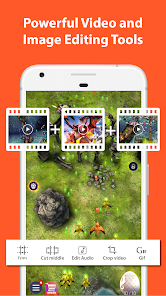
After recording, you can use AZ Recorder's built-in editing features to trim, cut, and merge your videos effortlessly. This user-friendly functionality lets you enhance your recordings directly within the app, saving you time and hassle by eliminating the need for separate editing software.

High-Quality Recording

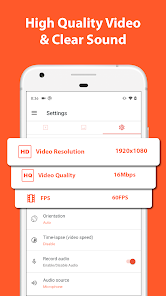
Capture your screen in stunning high definition with AZ Recorder, ensuring that every detail is crystal clear. Whether you're creating tutorials, gameplay videos, or presentations, this feature guarantees that your content looks professional and polished, making it perfect for sharing with friends or followers.

Live Streaming Capability

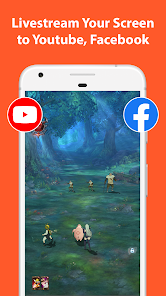
AZ Recorder allows you to broadcast your screen live to platforms like YouTube and Facebook, making it perfect for gamers, educators, or anyone wanting to engage with an audience in real time. This feature enhances your streaming experience by providing a seamless connection to your followers, allowing for instant interaction.

No Time Limit

Unlike many other screen recording apps, AZ Recorder offers unlimited recording time, allowing you to capture long sessions without interruptions. This is especially beneficial for gamers and educators who need to record extensive gameplay or detailed instructional videos without worrying about cutting off important content.

Advertisement

Pros & Cons

Pros
  • High-quality screen recording for clear visuals
  • No time limit for extended recordings
  • User-friendly interface for easy navigation
  • Supports multiple formats for versatile sharing
  • Built-in editing tools for quick post-production
Cons
  • Limited editing features for recorded videos
  • Watermark on free version can be distracting
  • Performance issues on older devices
  • Ads may interrupt user experience

Real Experience Using Screen Recorder - AZ Recorder

Application Scenarios

Screen Recorder - AZ Recorder is a versatile application that caters to a wide range of recording needs. Whether you're a gamer looking to capture your gameplay, a teacher wanting to create instructional videos, or simply someone who wants to record a video call, this app has you covered. Its intuitive interface allows users to start recording instantly, making it ideal for spontaneous situations. Additionally, the app supports various resolutions and frame rates, enabling users to tailor their recordings to suit their specific requirements. This flexibility makes it suitable for both casual users and professionals alike, allowing for high-quality content creation on the go.

User Experience

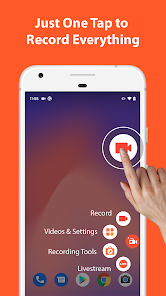
The user experience of AZ Recorder is commendable, characterized by its straightforward navigation and responsive controls. Upon launching the app, users are greeted with a clean and uncluttered interface, making it easy to access all features. Recording can be initiated with just a tap, and there are options to include audio from the microphone or system sound, depending on the user's needs. The editing tools integrated into the app also stand out, allowing users to trim recordings, add music, and incorporate text overlays seamlessly. Furthermore, the app performs well in terms of stability, with minimal lag during recording sessions. Overall, the experience is smooth, providing users with the confidence to produce high-quality recordings without a steep learning curve.

Pricing

AZ Recorder offers a free version that provides essential recording features, making it accessible to a wide audience. However, for users seeking more advanced functionalities, such as removing ads or accessing premium editing tools, the app offers a subscription model. The pricing is competitive, and many users find that the investment is justified given the quality and range of features available. The app also occasionally runs promotional offers, allowing users to explore premium features at a reduced cost, which enhances its appeal.

Updates & Support

The developers of AZ Recorder are proactive in providing updates and support, ensuring that users have access to the latest features and improvements. Regular updates introduce new functionalities and address any bugs, enhancing overall app performance. The support team is responsive, with various channels available for users to seek assistance, including in-app FAQs and direct customer support options. This commitment to user satisfaction has helped foster a loyal community of users who appreciate the ongoing enhancements to the application.

verified Security & Privacy Review

The Screen Recorder - AZ Recorder app prioritizes user privacy and data security while providing its screen recording features. The app is designed to operate without requiring rooting or additional modifications to your device, which enhances its security profile. However, it does request several permissions to function effectively, such as access to your microphone, storage, and screen overlay. Users should be mindful when granting these permissions, as they can potentially lead to unauthorized access to personal data. AZ Recorder’s privacy policy outlines its commitment to user data protection, stating that it does not collect or store any personal information without consent. The app processes recordings locally on the device, minimizing the risk of data breaches associated with cloud storage. Furthermore, users have the option to manage their recordings and delete them at any time, providing additional control over their content. Overall, while the app is generally secure and respects user privacy, it is essential for users to remain vigilant about the permissions they grant and to stay informed about updates to the app's privacy practices.

Advertisement

User Reviews

  • Brandon Boyd
    2026/05/07

    App no longer recording audio. which kind of makes the whole thing pointless. I didn't change any settings (still set to internal audio). allowed audio as a permission in your app (it wasn't already allowed, for some reason), no dice. It worked fine, before a couple weeks ago... I downloaded other browsers to make sure it wasn't something Duckduckgo had changed. It didn't work in those, either.


  • Thahomie Ziblim

    2026/07/04

    When i updated this app, it took so long just to export videos that are 15mjbures or more. On the recent update, i updated it,and my videos are gone. not in the trash folder, not anywhere. I lost everything just because of a stupid update. this app isnt good for recordingblong videos. dont download this app. It's not good, and it's bad plus too many ads

  • AL
    2026/06/03

    I installed it just to record my WhatsApp voice calls but, ironically, it stops recording sound as soon as the calls start! Useless app for something it should be doing. I use a Motorola Edge 2022 running Android 15. Recording YouTube, the video portion worked fine, but the audio captured was extremely distorted. The recording contained mostly high-pitched sounds, making the audio difficult or impossible to understand. The audio issue makes the feature unusable for my needs.

  • Thomas Barager
    2024/10/18

    Without a doubt, the best possible screen recorder out there! It comes equipped with a video compressor and basic editor. Which is extremely useful. Also, the UI is not intrusive at all. It hides itself when being used, which is a major bonus. Not to mention, the devs give a fair amount of free space to hold all your videos. Sadly, the moment you start using their music, they slap a watermark on your video. 7/10 app I highly recommend.

  • Logan
    2021/05/04

    Used for the past 2 years and tbh never ran into a problem and it works great. Super recommend Edit: read other views. I have a flagship phone so I never run into issues and this is free, shouldn't be an issue if they left a watermark. Understandable if it was a paid for app, or apple, but you decide to pay less on the phone so some apps won't work as well as you would hope.

Review Source: Google Play store public user reviews.

FAQ

1

Does Screen Recorder - AZ Recorder collect my personal data?

Screen Recorder - AZ Recorder is designed to prioritize user privacy and does not collect personal data unless explicitly permitted by the user for specific features.

2

Does Screen Recorder - AZ Recorder offer a free trial or free version?

Yes, Screen Recorder - AZ Recorder offers a free version with basic features, allowing users to try out the app before considering any premium options.

3

Does Screen Recorder - AZ Recorder require an internet connection?

No, Screen Recorder - AZ Recorder does not require an internet connection to function. You can record your screen and edit videos offline.

4

How can I contact support or send feedback for Screen Recorder - AZ Recorder?

You can contact support or send feedback through the app's help section, or visit the official website for additional contact options, including email support.

5

How do I manage or cancel my Screen Recorder - AZ Recorder subscription?

You can manage or cancel your subscription through the app's settings or your app store account settings, following the prompts for subscriptions.

How to use Screen Recorder - AZ Recorder

1

How can I contact customer service for the AZ Recorder app?

You can reach customer service through the app's settings or their official website for support inquiries.

2

How do I find the customer service number for AZ Recorder?

The customer service number can typically be found within the app’s help section or on their official website.

3

How do I log in to my AZ Recorder account?

If you have an account, open the app, tap on the profile icon, and enter your login credentials.

4

Is there a way to activate AZ Recorder if necessary?

Usually, AZ Recorder does not require activation, but if prompted, follow the on-screen instructions to activate using your account.

What's New

🐞 Bug fixes and 🚀 Performance improvements.👉 Join us at https://discord.gg/8ty5xTENNM

Editor's Choice