This site uses cookies to enhance your user experience. By clicking any link on this site you are giving your consent to our cookie policy. Read more
Reject
Accept All

Advertiser and Editorial Disclosures

OurFamilyWizard Co-Parent App

OurFamilyWizard Co-Parent App

verified

OurFamilyWizard, LLC

4.5
Rating
500,000+ Downloads
2026.7.1 Version
  • category

    Category: Parenting

  • price

    Price: free

  • age rating

    Age Rating: Everyone

  • rating

    Rating: 4.5

  • available on

    Available on: /

  • updated on

    Updated on: Jul 6, 2026

Screenshot 1
Screenshot 2
Screenshot 3
Screenshot 4
Screenshot 5
Screenshot 6
Screenshot 7
Screenshot 8
Screenshot 9
Screenshot 10
Screenshot 11
Screenshot 12
Screenshot 13
Screenshot 14
Screenshot 15
Screenshot 16
Screenshot 17
Screenshot 18
Screenshot 19
Screenshot 20
Screenshot 21
Screenshot 22
Screenshot 23
Screenshot 24
Advertisement

Features & Highlights

Document Sharing

The document sharing feature allows co-parents to upload and share important files, such as school reports, medical records, and legal documents. This centralizes critical information and makes it easy for both parents to access what they need, enhancing collaboration and keeping everyone informed.

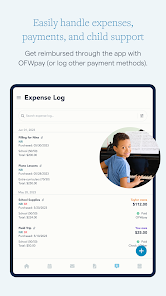
Expense Tracking

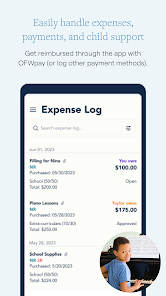
With the expense tracking feature, families can record and share expenses related to the children, ensuring that financial contributions are clear and documented. This helps foster accountability and simplifies the reimbursement process, making financial discussions smoother for both parents.

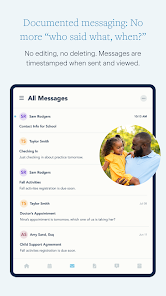
Messaging System

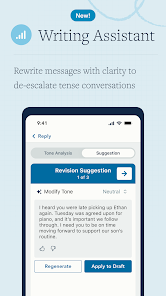
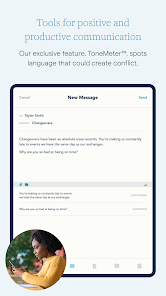
OurFamilyWizard's secure messaging system enables co-parents to communicate directly within the app, keeping all conversations organized and accessible. This feature promotes transparency and reduces miscommunication, making it easier to discuss important matters related to the children.

Shared Calendar

The shared calendar feature allows co-parents to effortlessly manage schedules for their children, avoiding conflicts and misunderstandings. You can easily add events, appointments, and important dates, ensuring both parents are on the same page and can plan accordingly.

Advertisement

Pros & Cons

Pros
  • Streamlines communication between co-parents to reduce misunderstandings.
  • Centralizes scheduling to prevent conflicts and enhance organization.
  • Offers expense tracking for shared costs, promoting transparency.
  • Provides a safe space for messaging, ensuring privacy and security.
  • Features helpful tools like calendars and reminders for effective co-parenting.
Cons
  • High subscription costs may limit accessibility for some co-parents.
  • The app's interface can be confusing for new users.
  • Limited functionality in offline mode restricts usability during poor connectivity.

Real Experience Using OurFamilyWizard Co-Parent App

Real Experience Application Scenarios

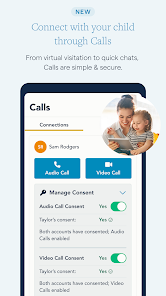
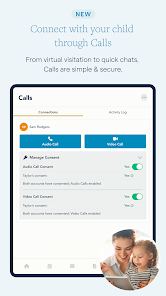
OurFamilyWizard Co-Parent App is designed primarily for divorced or separated parents who need an effective tool to manage their co-parenting responsibilities. One of the most common scenarios involves scheduling. Parents can easily share a calendar where they can input important dates like custody changes, school events, and appointments. This feature helps eliminate misunderstandings about parenting time and activities. Another prevalent scenario is communication; the app allows parents to message each other securely, keeping all discussions focused on the children. This can reduce the emotional strain often associated with co-parenting disputes. Additionally, the expense tracking feature is beneficial for parents who want to keep a record of shared costs related to their children, such as medical bills or extracurricular activities. This ensures transparency and accountability in financial matters.

User Experience

The user experience of OurFamilyWizard is generally intuitive and user-friendly. The interface is clean, making navigation straightforward even for those who may not be tech-savvy. Users have reported that the app works seamlessly on both iOS and Android devices, with a consistent performance across platforms. The calendar feature is a standout, allowing parents to color-code events and set reminders, which helps in keeping everyone informed. The messaging system is another highlight, as it archives conversations, ensuring that important communications are easily retrievable. Parents appreciate the emotional support resources offered through the app, which help them manage the challenges of co-parenting. However, some users have expressed a desire for additional customization options in the calendar and messaging features to better suit their individual needs.

Pricing

OurFamilyWizard operates on a subscription model, which can be a consideration for parents who are already navigating financial challenges post-separation. The pricing is generally competitive, offering monthly and annual subscriptions. While some users find the cost justifiable given the value it provides in streamlining co-parenting responsibilities, others feel that it could be more affordable. The app often provides discounts for families with low income or offers financial assistance through courts, which can make it more accessible to a wider audience. It’s worth noting that the investment may lead to significant savings in terms of time and emotional energy spent on co-parenting disputes.

Updates & Support

The developers of OurFamilyWizard are committed to regularly updating the app to enhance user experience and introduce new features. Users can expect periodic updates that address bugs and improve functionality. Customer support is readily available through various channels, including email and live chat, ensuring that users can get help when needed. The support team is known for being responsive and helpful, which adds to the overall positive experience of using the app. Additionally, the app provides extensive resources, including FAQs and instructional videos, making it easier for users to navigate any challenges they encounter. Overall, the combination of consistent updates and effective support makes OurFamilyWizard a reliable tool for co-parents.

verified Security & Privacy Review

Security & Privacy Review The OurFamilyWizard Co-Parent App prioritizes user security and privacy by implementing robust encryption protocols, ensuring that all personal information and communication between co-parents remain confidential. The app utilizes SSL encryption for data transmission, safeguarding sensitive information from unauthorized access during online interactions. User data handling practices are transparent, with the app explicitly outlining what information is collected, how it is used, and the measures taken to protect it. OurFamilyWizard does not sell user data to third parties, reinforcing its commitment to user privacy. Additionally, the app offers customizable permissions, allowing users to control who can view and access specific information within the platform. Regular updates and security audits further enhance the app’s reliability, addressing vulnerabilities and maintaining compliance with privacy regulations. With a focus on creating a safe environment for co-parenting, OurFamilyWizard demonstrates a strong dedication to protecting user data while fostering effective communication between parents.
Advertisement

User Reviews

  • Paul Delano
    2026/05/31

    This app needs a lot of work. I had thought that it was confusing that the app sends multiple notifications for a single message. Until I figured out that my ex was marking days on the calendar. I had opened up the calendar on a hunch. It would help if upon opening the app if there were a notification on the applicable tab (message, calendar, etc).

  • Kellyn Marie
    2026/01/26

    This is a great app overall. However, the calendar functionality could use some work. Every time I try to input an all day event on the web, it gives me an error that the end date can't be before the start date. Also, when I create a repeated event, I'd like to be able to go in and delete certain days (like if I set up Awana's every week but they take a week off, I don't know how to delete just one week). Overall a very helpful app!

  • Serhii Parkhomenko
    2026/04/09

    I started creating my account and reached the step “You’re in! Let’s finish setting up your account.” When I try to create a password, I get the error: “An unknown error has occurred” and below it says: “Cannot match your username or email address.” It looks like my account is partially created but I cannot complete registration. Please reset my account so I can finish setup.

  • KATIE BELVILLE
    2026/05/30

    Do NOT download and waste your time. There is not even a trial. When it comes to something as complicated as Co-parentingot you would think the creaters of a vo-parentimg app would understand that having a trial period or a basic 1 month subscription would be very necessary, so that both parties can see if it would be best for thwir situation. Yet, I have only options of a 1 time bill annually of the cheapest most basic option of over $100???? Are you kidding me? Don't waste your precious time.

  • Heather Keyes
    2024/09/28

    This app is DEFINITELY overpriced, especially with all of the issues that come with it. With adding teachers/healthcare providers etc, you can't go back in to change something because it won't save. So if you need that info in there, you have to creat a new contact. Also, you can't add expenses for your kid to show that you're paying for everything w/o adding what the other parent owes. Sometimes notifications for messages don't go through, either. For as much $ that I pay, it's too much work!

Review Source: Google Play store public user reviews.

FAQ

1

Can I submit suggestions or feedback to OurFamilyWizard Co-Parent App?

Yes, users are encouraged to submit suggestions or feedback through the app or customer support channels to help improve the service.

2

Does OurFamilyWizard Co-Parent App collect my personal data?

Yes, the app collects personal data necessary for account creation and usage, but it is committed to user privacy and protects this information according to its privacy policy.

3

Does OurFamilyWizard Co-Parent App support offline use?

Yes, OurFamilyWizard Co-Parent App allows some functionalities to be accessed offline, but users will need an internet connection to sync changes and updates once they are back online.

4

How do I cancel my OurFamilyWizard Co-Parent App subscription?

To cancel your subscription, you can log into your account through the app or website and follow the cancellation process outlined in the account settings.

5

How much does a subscription to OurFamilyWizard Co-Parent App cost?

Subscription pricing may vary based on the plan selected, but typically it offers monthly and annual payment options with discounts for longer commitments.

How to use OurFamilyWizard Co-Parent App

1

Can I log in using my mobile device?

Yes, you can log in to the OurFamilyWizard app using your mobile device by entering your email and password in the login screen.

2

How can I contact customer service for help with my account?

You can reach customer service via the support page on our website or by calling the customer service number listed there.

3

How do I activate my account after signing up?

To activate your account, check your email for an activation link we sent you after registration, and follow the instructions provided.

4

How do I reach customer service for technical issues?

You can contact customer service through our website's support section or by calling the customer service number provided there for technical assistance.

5

How do I update my customer number if it's incorrect?

Customer numbers cannot be updated by users. Please contact customer service for assistance in correcting any inaccuracies.

What's New

We've been hard at work improving the app to help it run smoothly. We made some tweaks, and fixed some bugs. We laid the groundwork for more improvements, too—so keep an eye out for future updates. We're always working to make the app more effective and easier to use.



Editor's Choice