This site uses cookies to enhance your user experience. By clicking any link on this site you are giving your consent to our cookie policy. Read more
Reject
Accept All

Advertiser and Editorial Disclosures

Weatherzone: Weather Forecasts

Weatherzone: Weather Forecasts

verified

DTN APAC Pty Ltd

4.2
Rating
1,000,000+ Downloads
7.5.1 Version
  • category

    Category: Weather

  • price

    Price: free

  • age rating

    Age Rating: Everyone

  • rating

    Rating: 4.2

  • available on

    Available on: /

  • updated on

    Updated on: May 13, 2026

Screenshot 1
Screenshot 2
Screenshot 3
Screenshot 4
Screenshot 5
Screenshot 6
Screenshot 7
Screenshot 8
Advertisement

Features & Highlights

Customizable Notifications

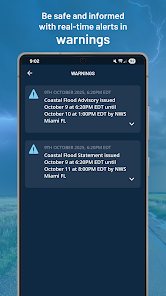
Set up customizable notifications to receive alerts tailored to your preferences. Whether it's severe weather warnings or daily forecasts, you can choose how and when you want to be notified, ensuring you're always prepared for whatever the weather brings.

Detailed Forecasts

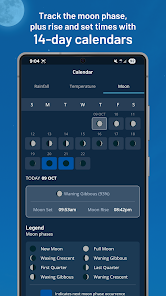
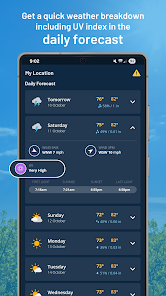
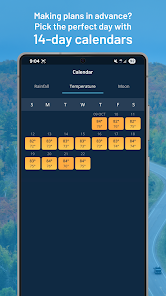
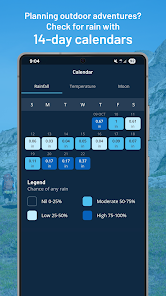
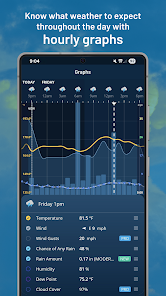
Get comprehensive forecasts that break down weather conditions hour-by-hour and extend up to 14 days. This feature allows you to plan your activities with confidence, as you'll have access to temperature, precipitation, and wind details for any location you choose.

Interactive Radar Maps

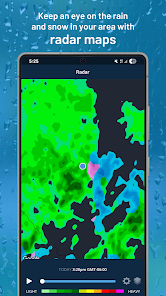
Visualize weather patterns with interactive radar maps that offer a clear view of incoming weather systems. You can zoom in on your specific area to see rain, storms, and other significant weather events, making it easier to stay ahead of any surprises.

Real-Time Weather Updates

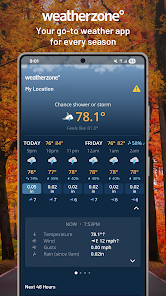
Stay informed with real-time weather updates that keep you ahead of changing conditions. Weatherzone provides accurate forecasts that are regularly updated, ensuring you have the latest information at your fingertips, whether you're planning a day out or preparing for a storm.

Advertisement

Pros & Cons

Pros
  • Accurate and reliable forecasts tailored to your location.
  • Real-time updates keep you informed about changing weather conditions.
  • User-friendly interface makes navigation simple and intuitive.
  • Comprehensive data includes radar, satellite imagery, and detailed reports.
  • Custom alerts ensure you never miss important weather changes.
Cons
  • Limited coverage in remote areas can lead to inaccurate forecasts
  • Subscription costs may deter casual users from accessing premium features
  • Occasional technical glitches can disrupt the user experience and reliability

Real Experience Using Weatherzone: Weather Forecasts

Application Scenarios

Weatherzone: Weather Forecasts is an essential tool for anyone who needs reliable weather information on the go. Whether you are a traveler planning a weekend getaway, a parent organizing outdoor activities for your children, or a professional requiring accurate forecasts for your work, this app caters to a wide range of scenarios. For outdoor enthusiasts, Weatherzone provides detailed forecasts that include not just temperature and precipitation but also information on wind conditions, UV levels, and humidity. This can be invaluable for hikers, cyclists, and athletes who want to ensure optimal conditions for their activities. Additionally, if you're commuting or traveling, the app delivers timely alerts about severe weather events, helping users stay informed and make safe decisions.

User Experience

The user experience of Weatherzone is exceptionally intuitive and user-friendly. Upon opening the app, users are greeted with a clean and organized interface that makes navigation a breeze. The home screen displays current weather conditions and a five-day forecast, with options to view hourly forecasts and detailed breakdowns for each day. One of the standout features is the interactive radar maps that allow users to visualize weather patterns in real time, enhancing the overall experience. The app also offers personalized notifications for weather changes, ensuring that users receive timely updates relevant to their location. The customizable settings enable users to adjust temperature units and select specific alerts, making it a tailored experience for everyone.

Pricing

Weatherzone is available for free, which is a significant advantage for users who want to access reliable weather information without financial commitment. The free version includes standard features such as basic forecasts and weather alerts. However, for those seeking a more comprehensive experience, Weatherzone offers a premium subscription that unlocks additional features such as advanced radar imagery, detailed climate statistics, and ad-free browsing. The pricing is competitive, making it an attractive option for users who want enhanced functionality without breaking the bank. This tiered approach allows users to choose a plan that best suits their needs and budget.

Updates & Support

Weatherzone is committed to providing users with regular updates and robust support. The development team frequently releases updates that improve app performance, add new features, and enhance user experience based on feedback. Users can expect timely bug fixes and enhancements that keep the app running smoothly. Additionally, Weatherzone provides excellent customer support, with a dedicated team ready to assist users with any inquiries or issues they may encounter. The app also features a comprehensive FAQ section, helping users resolve common questions independently. Overall, Weatherzone stands out not only for its impressive features but also for its commitment to user satisfaction through continuous improvement and support.

verified Security & Privacy Review

Security & Privacy Review Weatherzone: Weather Forecasts demonstrates a commitment to user security and privacy through its transparent data handling practices. The app requires essential permissions such as location access to provide accurate weather updates, but it allows users to choose whether to enable this feature. This optional approach empowers users to maintain control over their personal information. The app employs encryption protocols to protect user data during transmission, ensuring that sensitive information remains secure from unauthorized access. Additionally, Weatherzone adheres to industry-standard privacy policies that inform users about data collection and usage. The app does not share personal data with third parties for marketing purposes, further enhancing user trust. While the app collects anonymized data to improve service quality and user experience, users can manage their privacy settings directly within the app. Overall, Weatherzone prioritizes user privacy and data security, making it a reliable choice for those seeking weather forecasts without compromising their personal information.
Advertisement

User Reviews

  • Clare Hooper
    2025/06/23

    Update - so the app is working again however it includes the sunset last light time as 5.08pm, it's now 5.10pm and still daylight! At least the other bugs got fixed...

  • Mitch Payne
    2026/05/22

    Used to be an awesome app but has gone down hill. Too many add's, and Outlook forecast is never accurate any more. The final straw for me was they pulled the best widget they had which I use everyday and left the sub average ones behind and releasing another one, which isn't interactive like the old one. bring back the better widgets!

  • Nick S
    2026/06/18

    thanks guys, I appreciate having barely any info in my widgets compared to before, as well as them being able to double as opening both the clock app for alarms and timers, and the weather app. man it really sucked having that convenience. im glad they removed it... edit: dont be confused, i was joking because you've made some terrible decisions. I've been a user for over 16 years but I'm off the app now.

  • Alex H
    2026/05/19

    Not happy about the complete loss of the compact widgets. The new ones all take up way too much real estate, and with info I don't need. Been using weatherzone for years and years and always used the smaller widgets. Edited to add: And no, they cannot be reduced to a smaller size. That was the first thing I tried.

  • Chris Rossi
    2026/05/26

    Used this app for years but the latest update removed the 1x5 widget, which was the only one I ever liked. Tried all the new ones but when they're condensed to a smaller size the text size scales way too small to be readable. The 2x5 widget doesn't condense to 1x5 without cutting off all the content. Please restore the old widget. All I want is to see the time and the weather in a single row, I can't do that anymore in this version.

Review Source: Google Play store public user reviews.
FAQ

1

Can I submit suggestions or feedback to Weatherzone: Weather Forecasts?

Yes, users can submit suggestions or feedback directly through the app or via the official website to help improve the service.
2

Does Weatherzone: Weather Forecasts collect my personal data?

Weatherzone: Weather Forecasts may collect user data to enhance functionality and provide personalized experiences, but it adheres to privacy standards.

3

Does Weatherzone: Weather Forecasts support offline use?

Yes, Weatherzone: Weather Forecasts allows users to access certain features and previously downloaded weather data even when offline.

4

How do I cancel my Weatherzone: Weather Forecasts subscription?

You can cancel your subscription through the app store where you purchased it, following the standard cancellation procedures for that platform.

5

How much does a subscription to Weatherzone: Weather Forecasts cost?

The subscription cost for Weatherzone: Weather Forecasts varies depending on the chosen plan, typically offering monthly or annual options.

How to use Weatherzone: Weather Forecasts

1

Can I access my account from multiple devices?

Yes, you can log in to your Weatherzone account from any device using your email and password.

2

Can I change my Customer Number?

Unfortunately, Customer Numbers cannot be changed. For any issues, please contact Customer Service for support.

3

How can I contact Customer Service for Weatherzone?

You can reach Customer Service by visiting our website and using the contact form or calling our support number listed there.

4

How do I contact Customer Service for billing inquiries?

For billing inquiries, please use the dedicated billing section in our contact form or call our Customer Service number.

5

How do I log in to my Weatherzone account?

To log in, visit our website and enter your email and password in the login section.

What's New

Our new Hourly and Daily Forecast widgets have just landed! It’s a snapshot of your most important weather conditions right on your home screen. Feel free to configure what’s displayed, including the widget’s size and background theme. If you are using any of the classic widgets, you’ll notice that they have now been removed to make way for the new upgraded versions – simply add and resize accordingly. Let us know about your experience! Your feedback will help to shape future updates.

Editor's Choice