This site uses cookies to enhance your user experience. By clicking any link on this site you are giving your consent to our cookie policy. Read more
Reject
Accept All

Advertiser and Editorial Disclosures

Shell: Fuel, Charge & More

Shell: Fuel, Charge & More

verified

Shell Information Technology International B.V.

3.1
Rating
1,000,000+ Downloads
9.5.0 Version
  • category

    Category: Auto & Vehicles

  • price

    Price: free

  • age rating

    Age Rating: 17+

  • rating

    Rating: 3.1

  • available on

    Available on: /

  • updated on

    Updated on: Jun 23, 2026

Screenshot 1
Screenshot 2
Screenshot 3
Screenshot 4
Screenshot 5
Screenshot 6
Advertisement

Features & Highlights

Easy Payment Options

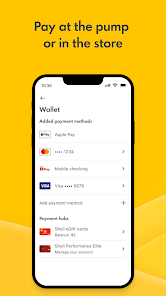
Streamline your fueling experience with easy payment options directly through the app. You can pay securely using your credit card or linked Shell account, making transactions quick and hassle-free, so you can get back on the road faster.

Electric Vehicle Charging

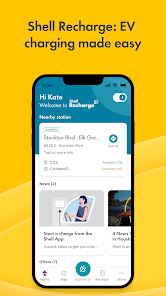
For electric vehicle owners, the app provides convenient access to charging station locations and availability. You can filter by charging speed and see real-time updates, ensuring that you can easily plan your charging stops during your travels.

Fuel Finder

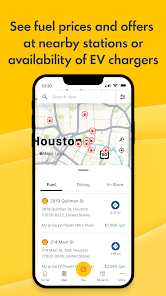
Easily locate the nearest Shell stations with the Fuel Finder feature, saving you time and ensuring you're never far from your next fill-up. You can view station amenities, fuel types, and real-time prices, making it simple to choose the best option for your needs.

Rewards Program Access

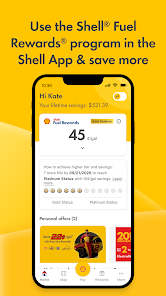
Join the Shell Rewards program directly through the app to earn points on every fuel purchase and redeem them for discounts or freebies. The app keeps track of your points, making it easier than ever to enjoy the benefits while fueling up.

Advertisement

Pros & Cons

Pros
  • Convenient fuel stations located nationwide
  • Efficient electric vehicle charging options available
  • Loyalty rewards program for savings and benefits
  • High-quality fuels for optimal vehicle performance
  • 24/7 service for all your travel needs
Cons
  • Limited availability in certain regions
  • Higher prices compared to competitors
  • User interface can be confusing at times
  • Customer service response times may be slow

Real Experience Using Shell: Fuel, Charge & More

Application Scenarios

The Shell app is designed to cater to a variety of scenarios, making it a versatile tool for drivers and vehicle owners. One of its primary functions is to locate Shell fuel stations quickly and efficiently, which is particularly useful for those on long road trips or commuting daily. The app features a GPS-based search that allows users to find the nearest stations, view fuel prices, and even check station amenities. Additionally, the app offers a fuel rewards program, incentivizing users to earn points with every purchase, which can be redeemed for discounts or free fuel. This feature encourages users to make the app their go-to fuel management tool. Furthermore, the app is beneficial for electric vehicle owners, as it provides access to charging station locations, making it easier for them to plan their journeys. Overall, whether you are refueling your gas-powered vehicle or charging your electric car, the Shell app has you covered.

User Experience

User experience with the Shell app is generally positive, characterized by an intuitive interface and seamless navigation. Upon opening the app, users are greeted with a clean and organized layout that makes it easy to access vital features. The map functionality is a standout, as it provides real-time data on fuel prices and station availability, allowing users to make informed decisions about where to stop. The app also includes a rewards section that is straightforward to navigate, enabling users to track their points and redeem them effortlessly. One notable aspect is the personalized user experience; the app remembers frequent locations and preferences, enhancing convenience. However, some users have reported occasional glitches, particularly during peak usage times, which can disrupt the experience. Despite these minor issues, the overall user interface and functionality remain strong, contributing to a satisfactory experience.

Pricing

The Shell app itself is free to download and use, which is a significant advantage for users. There are no hidden fees associated with the app, making it accessible to everyone. However, while the app provides numerous free features, such as fuel station locations and price comparisons, users should be aware that they will still need to pay for fuel and any related services at the stations. The rewards program offers opportunities to save money, but it requires users to actively participate by linking their Shell fuel cards or credit cards. This integration allows for automatic point accumulation, which can lead to substantial savings over time, particularly for frequent drivers.

Updates & Support

The Shell app is regularly updated, with developers continually improving functionality and addressing user feedback. These updates often include enhancements to the map features, user interface tweaks, and performance improvements. Users can expect timely updates that reflect the latest trends in fuel prices and new station openings. Additionally, Shell has a dedicated support team that can be reached through the app for any technical issues or inquiries. The support section includes FAQs, troubleshooting tips, and contact information for further assistance. Overall, the commitment to regular updates and robust customer support enhances the app's reliability and user satisfaction.

verified Security & Privacy Review

The Shell: Fuel, Charge & More app prioritizes user security and privacy through robust data protection measures. The app employs encryption protocols to safeguard sensitive information, ensuring that user data, including payment details and location, remains protected during transmission. When it comes to permissions, the app requests access to essential features such as location services for locating nearby Shell stations and charging points. Users are informed clearly about the necessity of these permissions, allowing them to make informed decisions about their data sharing. Additionally, the app allows users to modify their privacy settings and control what information is shared. Shell's privacy policy outlines how user data is collected, utilized, and stored. The company commits to not sharing personal information with third parties without explicit consent, thus reinforcing user trust. Regular updates and security patches are also implemented to address potential vulnerabilities, showcasing Shell's dedication to maintaining a secure and private user experience.
Advertisement

Compare APP

User Reviews

  • Terry Hill
    2026/04/11

    This app is incredibly frustrating due to the redundant sign-on requirements. It’s never clear which password belongs to the Fuel Rewards program versus the Shell app itself. Even as a tech-savvy user, I found the interface so confusing that I gave up after four attempts and took my business elsewhere. The login process needs a major overhaul.

  • Chad O'keefe
    2025/10/13

    Horrible! It's the only app I could add gas on immediately. What a mistake. I should have refined the stuff myself. Plus there's only 3 or 4 shells around here. Two didn't take them, one is unmanned. I tried to add another 100, and it wouldn't add it.. I had to call for a refund.. That was 2days ago. It's October 13th. No refund.

  • Jimmy DeCoster
    2024/10/03

    Doesn't work for Shell, formerly Volta, stations. It says they are occupied. Chargepoint correctly shows them available. Too bad I didn't realize this until I had to leave without getting any charge on what was a free station which used to be plug and play under Volta. They also don't recognize + in email which I use for filtering. Absolute garbage.

  • Rose
    2026/06/29

    If 0 stars was possible, you'd see it. 100% unnecessary to have 2 apps (FR & Shell) just to do anything. No matter what, your freshly signed up account info will not log you in. The mess began when I ended up with a gift card to use for gas. Way more trouble than its worth. I called "support" on 2 different days for 20+ mins each right at their opening time & 0 accountability for the unnecessary frustrating nonsense process. Gave up & posted my gift card free to anyone who's already a user.0/10

  • Don McGlothlin
    2026/05/14

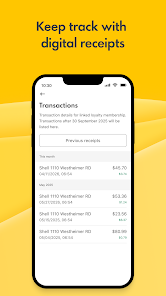
    I tried the option to pay through the app. Even though my fuels reward account is tied to this app, it did not give me my rewards discount, show up as a purchase towards maintaining my membership status, or even register in the app's transaction history log. I put in a help request on this issue, but after several days, I have not received a response. I have been a Shell fuels rewards member for a number of years, it is troubling to see the loss in customer service.

Review Source: Google Play store public user reviews.

FAQ

1

Does Shell: Fuel, Charge & More collect my personal data?

Yes, Shell: Fuel, Charge & More collects certain personal data to enhance user experience, such as location data, transaction history, and account details, in accordance with its privacy policy.

2

Does Shell: Fuel, Charge & More offer a free trial or free version?

Shell: Fuel, Charge & More is free to download and use, with no subscription fees or trials required for accessing its core features.

3

Does Shell: Fuel, Charge & More require an internet connection?

Yes, an active internet connection is required to use Shell: Fuel, Charge & More, as it relies on real-time data for locating stations and accessing features.

4

How can I contact support or send feedback for Shell: Fuel, Charge & More?

Users can contact support or send feedback through the app's help section or by visiting the official Shell website, where additional contact information and support resources are available.

5

How do I manage or cancel my Shell: Fuel, Charge & More subscription?

Since Shell: Fuel, Charge & More does not offer a subscription service, users do not need to manage or cancel any plans. However, users may update their account settings or preferences within the app.

How to use Shell: Fuel, Charge & More

1

How can I find my customer number for the Shell app?

Your customer number is usually found in your account settings within the app or on your Shell account statement.

2

How do I activate my account on the Shell: Fuel, Charge & More app?

After downloading the app, create an account by entering your details and verifying your email. Follow the prompts to complete activation.

3

How do I contact customer service for the Shell: Fuel, Charge & More app?

You can reach customer service through the app's help section or by calling the customer service number listed on the Shell website.

4

How do I log in to the Shell: Fuel, Charge & More app?

Open the app, enter your registered email and password, then tap 'Log In.' If you forget your password, use the 'Forgot Password?' link.

What's New

We’ve rolled out updates to improve your Shell App experience. Discover dining offers in the Station Locator, browse deals in the Offer Catalogue, and stack more savings with the Shell Performance Elite Credit Card. Easily manage and link loyalty accounts and payment methods in the Shell® Fuel Rewards® Hub!

Editor's Choice