This site uses cookies to enhance your user experience. By clicking any link on this site you are giving your consent to our cookie policy. Read more
Reject
Accept All

Advertiser and Editorial Disclosures

Securus Mobile

Securus Mobile

verified

Securus Technologies, LLC

3.6
Rating
5,000,000+ Downloads
5.1.2 (build 2) Version
  • category

    Category: Social

  • price

    Price: free

  • age rating

    Age Rating: Teen

  • rating

    Rating: 3.6

  • available on

    Available on: /

  • updated on

    Updated on: Jun 17, 2026

Screenshot 1
Screenshot 2
Screenshot 3
Screenshot 4
Screenshot 5
Screenshot 6
Screenshot 7
Screenshot 8
Screenshot 9
Screenshot 10
Screenshot 11
Screenshot 12
Screenshot 13
Screenshot 14
Screenshot 15
Advertisement

Features & Highlights

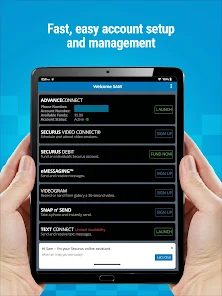
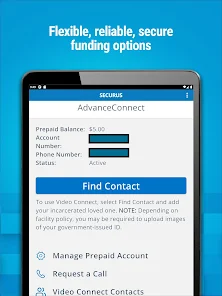
Account Management

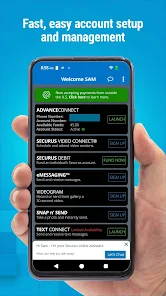
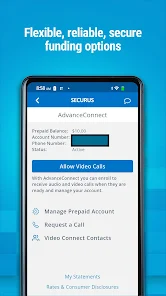
Securus Mobile offers a straightforward account management system, allowing users to easily view and manage their account details. From adding funds to checking transaction history, this feature makes it convenient to oversee your account and stay on top of your communications without any hassle.

Messaging Services

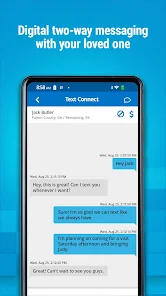
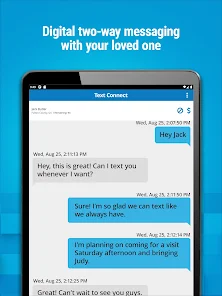
Stay connected with easy-to-use messaging options that allow you to send and receive messages securely. This feature provides a user-friendly interface, enabling quick exchanges and ensuring that important updates are always shared. Whether it’s a simple hello or an important message, communication is just a tap away.

Notifications & Alerts

Never miss an important update with customizable notifications and alerts from Securus Mobile. This feature ensures you are always informed about messages, calls, and account activity, giving you peace of mind. Tailor your notification settings to suit your preferences and stay connected effortlessly.

Video Calling

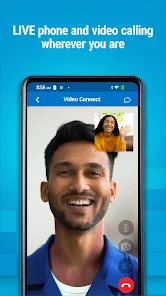
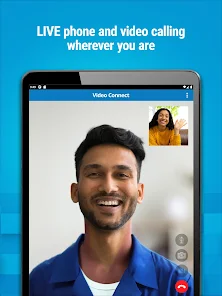
Experience seamless video communication with your loved ones through Securus Mobile. This feature allows for secure, real-time video calls, making it easier to maintain connections regardless of distance. Enjoy high-quality audio and video, ensuring that your conversations feel more personal and engaging.

Advertisement

Pros & Cons

Pros
  • User-friendly interface enhances navigation and accessibility.
  • Secure communication ensures privacy and confidentiality.
  • Real-time updates keep you informed instantly.
  • Multi-device compatibility offers flexibility and convenience.
  • Cost-effective plans save you money on communication.
Cons
  • Limited functionality compared to desktop version
  • High data usage during calls
  • Connectivity issues in certain areas
  • Complicated user interface for beginners

Real Experience Using Securus Mobile

Application Scenarios

Securus Mobile is designed primarily for individuals who need to maintain communication with incarcerated loved ones. The app provides a platform for users to send messages, schedule video visits, and manage phone calls with inmates. Families can utilize the app to stay connected during challenging times, ensuring that distance does not sever vital emotional ties. Additionally, the app can be beneficial for legal professionals who need to communicate securely with their clients in correctional facilities. Furthermore, the app serves as a tool for monitoring inmate activities and managing accounts, making it versatile for both personal and professional applications.

User Experience

The user experience with Securus Mobile is generally positive, with a user-friendly interface that simplifies navigation. Users appreciate the straightforward layout, which makes it easy to send messages or schedule visits. The app also offers push notifications, ensuring that users stay updated on any new messages or changes in their communication schedules. However, some users have reported occasional connectivity issues, particularly during peak times, which can disrupt video calls. Despite these hiccups, the majority find the app reliable for staying in touch. The ability to access account information, view transaction history, and manage funds adds to the overall convenience, making the app a valuable resource for families looking to maintain contact with incarcerated loved ones.

Pricing

Securus Mobile operates on a pay-as-you-go pricing model, where users need to fund their accounts to utilize the various communication services. The costs can vary significantly depending on the type of communication chosen—whether it’s messaging, video calls, or phone calls. While some users find the pricing to be reasonable, others have expressed concerns about the cumulative expenses associated with frequent communication. It is essential for potential users to review the pricing structure carefully, as charges can add up quickly, especially for those who wish to stay in regular contact with inmates.

Updates & Support

The Securus Mobile app is regularly updated to enhance functionality and address user feedback. These updates often include bug fixes, performance improvements, and occasionally new features aimed at improving user experience. Customer support is readily available through various channels, including in-app support, email, and phone. Response times can vary, but many users report receiving prompt assistance for their inquiries. The support team is knowledgeable and equipped to handle technical issues, which adds to the overall reliability of the app. Overall, Securus Mobile aims to provide a seamless experience, continually evolving to meet the needs of its users.

verified Security & Privacy Review

The Securus Mobile app places a strong emphasis on security and privacy, crucial for users managing sensitive information related to inmate communication. The app employs robust encryption protocols to safeguard data transmission, ensuring that messages and calls remain confidential. User authentication is enforced through secure login methods, reducing the risk of unauthorized access. In terms of permissions, Securus Mobile requires access to essential features such as the device's microphone and camera for communication purposes. However, it maintains a transparent approach, clearly outlining why these permissions are necessary for app functionality. Users have the option to manage permissions within their device settings, promoting user control over personal data. Securus Technologies, the parent company, adheres to strict privacy policies that dictate how user data is collected, stored, and utilized. The app does not sell personal information to third parties, focusing instead on enhancing user experience while prioritizing data protection. Overall, Securus Mobile demonstrates a commitment to maintaining user security and privacy, providing peace of mind for those utilizing its services.
Advertisement

Compare APP

User Reviews

  • Mandy Plympton Hancock (Handy Mandy's Cleaning)
    2025/09/06

    sometimes it's good sometimes it's not. I have had trouble connecting stating there are issues with the system on the remote video calls or it hung up on us in the middle of our visit. cannot get refunded for that. he states (& per attempts it shows) he calls & it doesn't come through, yet i get calls sometimes or it too will hang up in the middle of our conversation & tell both of that the other disconnected. it's hard to hear & sometimes there's a lot of back feed sometimes it's perfect so 3!

  • Joy Hoskins
    2026/06/11

    It's okay. In my opinion it's not as user friendly as Jpay was. Recently (June 10 2026) there has been a "network issue" preventing me from logging in since yesterday. I responded to the email on this app page and was informed by auto reply that for technical issues I should login to report. So it seems like if you can log in, you are just out of luck until they (maybe) fix it???

  • Cari
    2026/06/06

    lots of issues don't even know where to begin. as much money as I spend to send messages and texts you would think they could afford to have somebody fix all the bugs starting with at times the app automatically blocks me from friends and family for no apparent reason. and when you try to open either messages or the text it always says there's an error and then kicks me out of the hole app all together. so many more

  • Stephanie Munoz
    2026/05/24

    Poorly made app. I can't even get past the login because there is a constant pop up message saying "Error we are currently experiencing technical difficulties." I still have yet to actually make it into the app itself after creating an account. Do not recommend and it seems from the other reviews it doesn't function well at all for the money it costs to do a video call. I suggest sticking to regular phone calls. This is not worth it.

  • Carey Roush
    2026/06/06

    I like the idea that is Securus, but there are a lot of bugs that need worked out. It drops and loses written material so frequently it's superfrustrating. On occasion it loses entire messages during transfer. Transcriptions are substandard and you have to correct a myriad of errors. It won't keep a correct running account of messages from loved ones coming in. Of course it's expensive. I believe the creators don't personally use it to know how it functions or they'd improve it constantly. more

Review Source: Google Play store public user reviews.
FAQ

1

Does Securus Mobile collect my personal data?

Yes, Securus Mobile collects personal data necessary for account creation and usage, such as your name, email address, and payment information, as outlined in their privacy policy.

2

Does Securus Mobile offer a free trial or free version?

Securus Mobile does not typically offer a free version, but they may provide promotional offers or trials from time to time; check their website for the latest information.

3

Does Securus Mobile require an internet connection?

Yes, Securus Mobile requires a stable internet connection to function properly, as it relies on data streaming for video calls and messaging.

4

How can I contact support or send feedback for Securus Mobile?

You can contact Securus Mobile support through the app, the official website, or by calling their customer service line for assistance and feedback.

5

How do I manage or cancel my Securus Mobile subscription?

You can manage or cancel your Securus Mobile subscription directly through the app's settings or by visiting the account management section on the Securus website.

How to use Securus Mobile

1

Can I use the Securus Mobile app on multiple devices?

Yes, you can use the app on multiple devices as long as you log in with your account credentials.

2

How do I activate my account on the Securus Mobile app?

To activate your account, follow the prompts in the app after downloading it. You may need to verify your identity first.

3

How do I contact customer service for billing inquiries?

For billing inquiries, contact Securus customer service at 1-800-844-6591 for assistance.

4

How do I log in to the Securus Mobile app?

To log in, enter your username and password on the app's login screen.

5

Is there a mobile version of the Securus website?

Yes, the Securus website is mobile-friendly, allowing you to access services through your browser.

What's New

Video calling improvements and minor bug fixes.

Editor's Choice