This site uses cookies to enhance your user experience. By clicking any link on this site you are giving your consent to our cookie policy. Read more
Reject
Accept All

Advertiser and Editorial Disclosures

MSN

MSN

verified

Microsoft Corporation

4.5
Rating
10,000,000+ Downloads
18.295.01 Version
  • category

    Category: News & Magazines

  • price

    Price: free

  • age rating

    Age Rating: 10+

  • rating

    Rating: 4.5

  • available on

    Available on: /

  • updated on

    Updated on: Jun 30, 2026

Screenshot 1
Screenshot 2
Screenshot 3
Screenshot 4
Screenshot 5
Screenshot 6
Advertisement

Features & Highlights

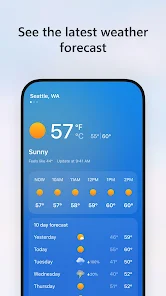
Comprehensive Weather Updates

Get accurate and up-to-date weather forecasts with MSN's comprehensive weather updates. You can view real-time conditions, hourly forecasts, and extended outlooks for your location or any destination, helping you plan your day or trips with confidence and ease.

Entertainment Hub

Explore the latest in entertainment with MSN’s dedicated hub featuring trending movies, TV shows, and celebrity news. This section keeps you in the loop with fresh content, reviews, and trailers, making it easy to discover what to watch next and stay entertained.

Integrated Email Access

MSN seamlessly integrates email access, allowing you to manage your inbox directly within the platform. This feature simplifies communication by providing easy access to your emails while you browse news and content, all in one convenient location.

Personalized News Feed

MSN offers a tailored news feed that curates articles and updates based on your interests and preferences. This feature ensures you stay informed about the topics that matter most to you, from current events to niche hobbies, making your reading experience both relevant and engaging.

Advertisement

Pros & Cons

Pros
  • Personalized news feeds keep you informed on topics that matter to you.
  • Seamless integration with Microsoft services enhances productivity and efficiency.
  • User-friendly interface allows easy navigation and quick access to information.
  • Discover trending stories and updates tailored to your interests and preferences.
  • Offline access lets you stay updated anytime, anywhere, without internet dependency.
Cons
  • Limited customization options may hinder user experience and personalization.
  • Frequent ads can disrupt content consumption and user engagement.
  • Integration issues with third-party apps may limit functionality and convenience.

Real Experience Using MSN

Real Experience Application Scenarios

MSN is designed to cater to a wide array of user needs, making it a versatile application for various scenarios. Whether you're looking to stay updated on the latest news, manage your emails, or connect with friends through instant messaging, MSN has you covered. The app is particularly useful for professionals who need to keep track of their schedules and communicate efficiently with colleagues. Additionally, it serves as a great platform for casual users who want to stay informed about entertainment, sports, and lifestyle trends. Families can also benefit from the app, as it allows for easy sharing of photos and messages, keeping everyone in the loop regardless of distance.

User Experience

The user experience on MSN is generally positive, thanks to its intuitive interface and user-friendly design. Upon opening the app, users are greeted with a clean layout that prioritizes easy navigation. The loading times are impressive, and the app runs smoothly without any noticeable lag. Users have praised the customizable features, allowing them to tailor the app to their preferences by selecting topics of interest and arranging content according to their needs. Moreover, the integration of various functionalities—such as news feeds, messaging, and email—within a single platform enhances the overall experience, making it a one-stop solution for communication and information.

Pricing

MSN follows a freemium model, which allows users to access a range of basic features at no cost. This makes it an attractive option for those who want to utilize its core functionalities without any financial commitment. However, there are premium features available through a subscription model, providing enhanced capabilities such as ad-free browsing, advanced customization options, and exclusive content. The pricing for the premium subscription is competitive when compared to similar applications, making it a worthwhile investment for users who seek a more comprehensive experience. Overall, the pricing structure caters to both casual users and those looking for additional features, ensuring a broad appeal.

Updates & Support

MSN is committed to continuous improvement, with regular updates that enhance functionality and introduce new features. The developers actively listen to user feedback, which is reflected in their update cycles. Users can expect frequent enhancements that address bugs, performance issues, and feature requests. Support options are readily available, including a dedicated help center and responsive customer service. Users have reported positive experiences when reaching out for assistance, indicating that the support team is knowledgeable and efficient in resolving issues. This commitment to updates and support contributes to a more reliable and enjoyable experience for all users.

verified Security & Privacy Review

Security & Privacy Review The MSN app prioritizes user security and privacy by implementing robust encryption protocols for data transmission, ensuring that personal information remains confidential during transfer. The app adheres to industry standards for data protection, which helps safeguard user data from unauthorized access. When it comes to permissions, MSN requires access to certain device features, including location and notifications, which are essential for delivering a personalized experience. Users are prompted to grant permissions at the time of installation, and can easily manage these settings through their device’s privacy controls. MSN's privacy policy is transparent, detailing how user data is collected, stored, and utilized. It explicitly states that personal information is not sold to third parties, and users have the option to opt-out of targeted advertising. Regular updates are rolled out to address any potential vulnerabilities, reinforcing the app's commitment to maintaining a secure environment for its users.
Advertisement

Compare APP

User Reviews

  • Mike S
    2026/04/05

    It's more than ridiculous that the mobile app from a foundational tech company like Microsoft cannot figure out how to link the correct video to play when you click on the link that it provides to a specific video. This has been occurring for months. It does not happen on the desktop app. I am on the verge of deleting the mobile app and moving on.

  • whateversam96
    2023/10/22

    I only downloaded this for the "deals" section. Not sure what the point of the rest of the app is since it's basic stuff you could do with things that come pre-downloaded on a phone, but whatever. Anyways, the deals section barely works. Half the time you can't scan a receipt. I had a special gas deal not go through, put in a ticket, and never got a response back. I waited over a month. Just awful. Definitely not worth the few pennies you get back. There are definitely better apps for that.

  • Alex Littman
    2021/09/18

    Frustrating app that has gone through many changes lately. You have categories for a reason, yet 1/2 the content in a category doesn't belong. Take for example "NFL", a large portion of the stories are college, a shooting near a high school, and high school. Some articles are not articles and instead links to some random podcast. Other articles track how often you view the sources content and then cuts you off. I'm finding myself using this app less and less because of those three reasons.

  • Mark Kemp
    2023/06/28

    They trick you into installing the app with a promise of 1000 Rewards Points, but then don't give you the points. This is happening to many people. Customer support asks for information and proof, then finally responds with a irrelevant email saying they had a conversation with you, that you made purchase, and they will refund it. No conversation, no purchase, what is there to refund? They cheat you.

  • Robert Williams
    2022/06/06

    The most comprehensive news app I've found, and the dark mode is essential. I won't use a news app without it. Use it on my laptops too. Even has comics, like a real newspaper. BUT it has a basic problem: it responds poorly to touch! I often have to tap several times to get an item to open, sometimes I have to press and hold, sometimes things won't open at all. It's very inconsistent, and it's not my phone, every other app works fine. You'd think this is like Coding 101 for a touch screen app.

Review Source: Google Play store public user reviews.

FAQ

1

Can I submit suggestions or feedback to Microsoft Start?

Yes, users can submit suggestions and feedback through the app's settings or help section, allowing them to communicate directly with the Microsoft Start team.

2

Does Microsoft Start collect my personal data?

Yes, Microsoft Start collects user data to personalize the content and improve user experience, but it follows privacy guidelines and provides options for managing privacy settings.

3

Does Microsoft Start support offline use?

Yes, Microsoft Start allows users to save articles for offline reading, enabling access even without an internet connection.

4

How do I cancel my Microsoft Start subscription?

Since Microsoft Start is free, there is no subscription to cancel. Users can simply stop using the app at any time.

5

How much does a subscription to Microsoft Start cost?

Currently, Microsoft Start is free to use, and there are no subscription fees associated with the app.

How to use MSN

1

Can I log in to MSN from multiple devices?

Yes, you can log in to your MSN account from multiple devices as long as you have your login credentials.

2

Can I update my customer number online?

No, customer numbers cannot be updated online. Please contact customer service for assistance with any changes needed.

3

How can I activate my MSN account?

To activate your MSN account, follow the link in the activation email you received after signing up. If you didn't receive it, check your spam folder.

4

How do I contact customer service for MSN?

You can reach MSN customer service by visiting the support page on their website or calling their dedicated helpline.

5

How do I find my customer number for billing inquiries?

Your customer number can be found on your billing statement or by logging into your account and checking your account details.

What's New

Microsoft Start is now MSN, same great experience and personalized content feed​.

Editor's Choice