This site uses cookies to enhance your user experience. By clicking any link on this site you are giving your consent to our cookie policy. Read more
Reject
Accept All

Advertiser and Editorial Disclosures

Assemblr Studio: Easy AR Maker

Assemblr Studio: Easy AR Maker

verified

Assemblr

3.3
Rating
1,000,000+ Downloads
4.4.3 Version
  • category

    Category: Graphic & Design

  • price

    Price: free

  • age rating

    Age Rating: Everyone

  • rating

    Rating: 3.3

  • available on

    Available on: /

  • updated on

    Updated on: Nov 23, 2025

Screenshot 1
Screenshot 2
Screenshot 3
Screenshot 4
Screenshot 5
Screenshot 6
Screenshot 7
Screenshot 8
Screenshot 9
Screenshot 10
Screenshot 11
Screenshot 12
Screenshot 13
Screenshot 14
Screenshot 15
Screenshot 16
Screenshot 17
Screenshot 18
Advertisement

Features & Highlights

Cross-Platform Compatibility

One of the standout features of Assemblr Studio is its cross-platform compatibility, which allows you to create and share AR experiences across various devices. Whether on mobile or desktop, your projects can reach a broader audience, ensuring your work is accessible wherever it's needed.

Customizable Templates

With a wide array of customizable templates, Assemblr Studio empowers users to kickstart their AR projects quickly. These templates serve as a foundation for your ideas, helping you to personalize and adapt them to suit your vision without starting from scratch.

Real-Time Collaboration

Assemblr Studio's real-time collaboration feature enables multiple users to work together seamlessly on AR projects. This functionality fosters teamwork, allowing you to share ideas, make edits, and see changes live, enhancing both creativity and productivity within your team.

User-Friendly Interface

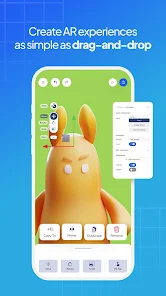
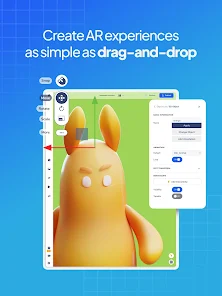
Assemblr Studio boasts an intuitive interface designed for all skill levels, making it easy for users to dive into augmented reality creation without any prior experience. The drag-and-drop functionality streamlines the design process, allowing you to focus on your creativity rather than technicalities.

Advertisement

Pros & Cons

Pros
  • Create stunning AR experiences without any coding knowledge required.
  • Effortlessly design interactive content using intuitive drag-and-drop features.
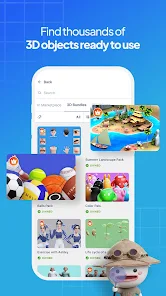
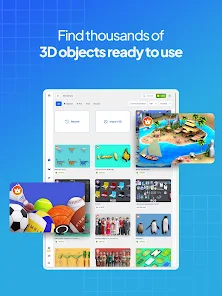
  • Access a vast library of 3D models and assets for customization.
  • Share your AR creations easily across various platforms and devices.
  • Enhance engagement and learning through immersive augmented reality experiences.
Cons
  • Limited customization options can restrict creative expression.
  • Performance issues may affect user experience during complex projects.
  • Steeper learning curve for beginners compared to more intuitive platforms.

Real Experience Using Assemblr Studio: Easy AR Maker

Real Experience Application Scenarios

Assemblr Studio: Easy AR Maker opens up a wide array of possibilities for users looking to integrate augmented reality into their projects. Whether you are an educator aiming to create interactive learning experiences, a marketer wanting to engage customers with immersive advertisements, or an artist showcasing your work in a dynamic way, this app provides the tools necessary to bring your ideas to life. Users can create 3D models, animations, and interactive experiences that can be viewed through smartphones or tablets, making it accessible for a diverse audience. From creating virtual exhibitions to developing AR games, the versatility of Assemblr Studio caters to both personal and professional needs, allowing users to express their creativity in innovative ways.

User Experience

The user experience in Assemblr Studio is designed to be intuitive and engaging. Upon launching the app, users are greeted with a clean, user-friendly interface that guides them through the creation process. The drag-and-drop feature allows for easy placement of 3D objects and animations, making it accessible even for those with minimal technical skills. Tutorials and templates are readily available, helping new users get acquainted with the functionalities without feeling overwhelmed. The AR viewing experience is smooth, with high-quality graphics that enhance the overall presentation. Users have reported feeling a sense of accomplishment as they see their creations come to life in real-world environments, providing a satisfying blend of creativity and technology.

Pricing

Assemblr Studio offers a freemium model, allowing users to experiment with basic features at no cost. This is ideal for those who want to test the waters before committing to a subscription. For users seeking advanced features, additional assets, and enhanced functionalities, the premium subscription provides access to a broader range of tools and resources. The pricing is competitive compared to similar AR creation platforms, making it an attractive choice for both amateurs and professionals. Regular promotions and discounts are frequently available, further enhancing its affordability.

Updates & Support

The developers of Assemblr Studio are dedicated to continuous improvement, regularly releasing updates that enhance functionality, fix bugs, and introduce new features. Users can expect a steady stream of enhancements that reflect the latest trends in AR technology. Customer support is robust, with multiple channels available for assistance, including email support and an active community forum. This ensures that users can find solutions to their queries promptly and share insights with others. The commitment to user satisfaction is evident in the app’s ongoing development and support, making Assemblr Studio a reliable choice for AR creation.

verified Security & Privacy Review

Security & Privacy Review Assemblr Studio: Easy AR Maker prioritizes user security and privacy through several key practices. The app employs encryption protocols to safeguard user data during transmission, ensuring that sensitive information remains protected against unauthorized access. In terms of permissions, Assemblr Studio requests access to the device's camera and storage, essential for creating and saving augmented reality content. Users are advised to review these permissions carefully, as granting access is necessary for the app's full functionality. However, the app does not request unnecessary permissions, which helps minimize potential privacy risks. Assemblr Studio's privacy policy clearly outlines how user data is collected, used, and shared. The app does not sell user data to third parties, and personal information is only utilized to enhance the user experience and improve app functionality. Users can manage their data preferences within the app settings, providing transparency and control over their information. Overall, Assemblr Studio demonstrates a strong commitment to user security and privacy, making it a reliable choice for those interested in augmented reality creation.
Advertisement

User Reviews

  • A Google user
    2019/07/04

    I mainly use this app to create basic models. It works really well and is easy to understand. I've tried many other similar apps and this was way better than many of them. I gave 4 stars instead of 5 because: -You can edit the appearance and basic dimensions of the objects but you can't create new shapes or make certain changes to existing ones. Ex. cut out part of a shape or change specific dimensions -You can't combine parts into a single part I would give five stars if these came in updates.

  • Cody Willoughby
    2020/11/06

    This app is amazing. It's the only app I've found with so many different capabilities and uses. I did have an issue with videos not playing, so I messaged the Assemblr team and they responded swiftly letting me know they were working on it. Then they messaged me again a few days later letting me know they updated the app and told me to let them know if it worked, and it did. Effective communication like that is hard to come by and goes a long way.

  • A Google user
    2020/04/04

    A couple small complaints. I personally would much rather use my back button that is on my phone instead of being forced to use the one in the app. I tried to start creating a model using the app and if I choose to skip account registration it kicks me back to the main menu. I'm assuming this is a small bug. Overall though great app! Not enough complaints to dock a star.

  • A Google user
    2020/02/19

    This app is a legend! At last I've found something awesome! It is similar to blender, in terms of creation. I really wanna rate it 5/5 but there are few bugs, like it lags a lot and keeps getting slow. But I still like this app. I would probably give it five stars after the bugs are fixed. Kindly try to fix those bugs sooner. And add more architecture possibilities then it wouldn’t even take a week to become famous :D

  • A Google user
    2019/04/04

    Really cool! unfortunately AR mode is broken on my phone (Pixel 3 XL) in the current version, objects do not place correctly on a surface and Jitters as i move my phone around. Hopefully this gets resolved, but otherwise it is an incredible fully featured 3d prototyping tool, with an insane editability for a mobile app. Very impressive!

Review Source: Google Play store public user reviews.

FAQ

1

Can I submit suggestions or feedback to Assemblr Studio: Easy AR Maker?

Yes, users can submit suggestions or feedback through the app or the official website, where they often encourage user input to improve the app.

2

Does Assemblr Studio: Easy AR Maker collect my personal data?

Yes, Assemblr Studio: Easy AR Maker may collect personal data as detailed in its privacy policy, which users should review to understand what information is collected and how it is used.

3

Does Assemblr Studio: Easy AR Maker support offline use?

Assemblr Studio: Easy AR Maker requires an internet connection for some functionalities, but it allows users to access previously created AR projects offline.

4

How do I cancel my Assemblr Studio: Easy AR Maker subscription?

To cancel your Assemblr Studio: Easy AR Maker subscription, you need to go to your device's settings, find the subscriptions section, and follow the prompts to cancel.

5

How much does a subscription to Assemblr Studio: Easy AR Maker cost?

The subscription cost for Assemblr Studio: Easy AR Maker varies based on the plan chosen, with options for monthly or yearly subscriptions available. Users should check the app for the most current pricing.

How to use Assemblr Studio: Easy AR Maker

1

Can I change my login details for Assemblr Studio?

Yes, you can change your login details by going to your account settings and updating your information.

2

How can I contact customer service for help with my Assemblr Studio account?

You can reach customer service via the support page on our website or by emailing support

3

How do I activate my Assemblr Studio account after signing up?

To activate your account, check your email for the activation link and follow the instructions provided.

4

How do I log in if I haven't activated my account yet?

You'll need to activate your account first by following the link sent to your email before you can log in.

5

Is there a customer number I can call for immediate assistance?

Yes, our customer number is available on the support page of our website for urgent inquiries.

What's New

They say it’s the coldest season of the yearWell, who says? Our updates will keep you warm through it all!- New looks on AnnotationAnnotation gets much better and neater! You can customize the color, and for the Line Annotation, you can also adjust the length of your annotation :wink:- Landscape orientation on tabletsBeen switching back and forth between portrait and landscape orientation on your tablet? From now on, we’ll lock it to landscape for a more hassle-free experienceUpdate now~

Editor's Choice