This site uses cookies to enhance your user experience. By clicking any link on this site you are giving your consent to our cookie policy. Read more
Reject
Accept All

Advertiser and Editorial Disclosures

Tapas

Tapas

verified

Tapas Entertainment Inc.

4.2
Rating
10,000,000+ Downloads
7.12.0 Version
  • category

    Category: Comics

  • price

    Price: free

  • age rating

    Age Rating: Teen

  • rating

    Rating: 4.2

  • available on

    Available on: /

  • updated on

    Updated on: Jun 25, 2026

Screenshot 1
Screenshot 2
Screenshot 3
Screenshot 4
Screenshot 5
Screenshot 6
Screenshot 7
Screenshot 8
Screenshot 9
Screenshot 10
Screenshot 11
Screenshot 12
Screenshot 13
Screenshot 14
Screenshot 15
Screenshot 16
Advertisement

Features & Highlights

Creator Support Features

Tapas empowers creators by providing tools for monetization and audience engagement, allowing them to share their work while earning revenue. Features like tipping and premium content options help foster a supportive community where both readers and writers can thrive together.

Diverse Story Genres

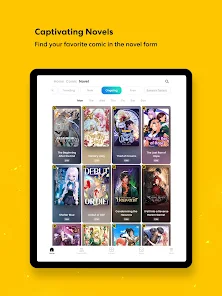
Tapas offers an extensive library of webcomics and novels across various genres, including romance, fantasy, and horror. This diversity allows users to explore new stories and discover hidden gems that cater to their unique tastes and preferences, ensuring there's something for everyone.

Regular Content Updates

With continuous updates and new releases, Tapas keeps its library fresh and exciting. Users can look forward to discovering new episodes and stories regularly, ensuring that their reading list is always filled with the latest content from their favorite artists and authors.

User-Friendly Interface

The app is designed with a clean and intuitive interface that makes navigating through stories a breeze. Users can easily browse, bookmark, and follow their favorite creators, enhancing their reading experience and keeping them engaged with the content they love.

Advertisement

Pros & Cons

Pros
  • Discover a diverse library of original comics and novels.
  • Enjoy content from both established and emerging creators.
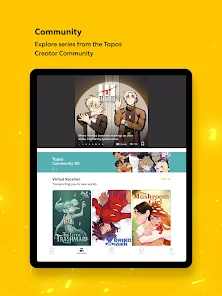
  • Engage with a vibrant community of passionate readers and artists.
  • Access stories across various genres and themes easily.
  • Support creators directly through a user-friendly platform.
Cons
  • Limited content variety may not satisfy diverse reader preferences
  • Frequent ads can disrupt the reading experience
  • User interface can be challenging for new users to navigate

Real Experience Using Tapas

Real Experience Application Scenarios

Tapas caters to a diverse audience, making it suitable for various application scenarios. It shines as a platform for avid readers and aspiring writers alike. Users can immerse themselves in a vast library of serialized stories and comics, making it an excellent choice for those who enjoy bite-sized narratives. Whether you're commuting to work, winding down at the end of the day, or seeking a quick distraction during breaks, Tapas offers an accessible escape into different worlds. Additionally, creators can leverage the app to share their original content, engage with their audience, and build a following, making it a powerful tool for self-publishing.

User Experience

The user experience on Tapas is generally seamless and intuitive. The app features an aesthetically pleasing interface that prioritizes ease of navigation, allowing users to browse through genres effortlessly. Categories are well-organized, and the search functionality is robust, helping readers find specific titles or discover new favorites. The reading experience itself is enhanced by customizable settings, including options for background color, font size, and scrolling preferences, catering to personal tastes and enhancing readability. Furthermore, Tapas encourages community engagement through comments and ratings, enabling users to interact with one another and with creators, fostering a sense of connection. However, some users have reported occasional glitches and loading issues, but overall, the experience remains positive.

Pricing

Tapas operates on a freemium model, giving users the option to access a significant amount of content for free. However, to unlock premium features, additional chapters, or exclusive content, users can purchase coins within the app. The pricing structure is relatively straightforward, with coins available in various packages to suit different budgets. This allows readers to support their favorite creators while enjoying a vast library of content. Moreover, Tapas often offers promotions and discounts, making it easier for users to explore premium content without breaking the bank.

Updates & Support

Tapas actively updates its platform, introducing new features and bug fixes to enhance user experience. The development team listens to user feedback, making adjustments based on community suggestions, which is a commendable aspect of their service. Users can easily access customer support through the app, with a dedicated help center addressing common issues and inquiries. Response times may vary, but the support team is generally helpful and responsive, ensuring that users feel valued and heard. Regular content updates keep the library fresh and exciting, making Tapas a dynamic platform that evolves with its audience.

verified Security & Privacy Review

Security & Privacy Review Tapas takes user security and privacy seriously, incorporating robust measures to protect personal data. The app employs end-to-end encryption for user communications, ensuring that sensitive information remains confidential. Additionally, Tapas adheres to industry-standard security protocols to safeguard user accounts from unauthorized access. When it comes to permissions, Tapas requests access to essential features such as storage and internet connectivity, which are necessary for optimal functionality. Users are provided with clear explanations regarding the need for these permissions, promoting transparency. Data handling practices are designed to comply with applicable privacy regulations. Tapas collects minimal personal data, primarily for account creation and user preferences. Users have the option to manage their data, including the ability to delete their accounts and associated information at any time. Overall, Tapas demonstrates a commitment to maintaining user privacy while offering a secure platform for enjoying digital content.
Advertisement

User Reviews

  • Hmr R
    2025/08/09

    It has good series, but is not friendly to binge readers. Most series you can read one episode per day for free. You can also buy ink to unlock more episodes. Episodes stay unlocked, but unlocking a full series is quite expensive, often ranging from 30-60$, depending on the number of episodes. At that price I would prefer to be buying physical copies. You can play games on other apps to get ink, so there's a work around, but the ones I've tried have been very time-consuming.

  • Maria “Tex”
    2024/08/30

    Updated: Tapas has gone down. They upped their ink per unlock and made it harder to earn free ink, and earned amounts are still the same compared to the upped prices. Wait Until Free keeps reopening chapters I'd already unlocked previously. For the 3 free ad unlocks, it barely works and often goes to an ad that won't load, and then takes away the rest of the chances. Original: Great stories and comics, and the app has lots of free ink opportunities and prize giveaways for users! Love this app!

  • Jessica Lievense
    2024/10/22

    This app continues to infuriate & frustrate me. They've completely removed ads to unlock on chapters except for ones that are already WUF & didn't tell us and some comics that had bundle deals no longer do. The interface is still a cluttered, unnecessary mess. All the chapters are more expensive even for ones they assured us wouldn't change. The fact that they're forcing us to update the app or it won't work properly is very telling of how much the app went under. It deserves a negative rating!

  • IceCreamCat
    2024/12/27

    Permanent WUFs were great, and it sucks that they removed them. One good update since I downloaded has been the addition of an ad for an episode feature, but that's a maximum of three per day, and only for certain comics. This feature only works on episodes that could already be unlocked for free with WUF, which majorly defeats the point I thought that they existed for. Many ink missions lately are useless and pointless to bother completing. Also, the mature comics are such a hassle to access.

  • Denise Heemskerk
    2026/06/17

    I actually really like Tapas, the app, itself. They have a good selection of stories, if a bit over priced. However, they use Tapjoy as their credit earning system and it's awful. Customer service is just a robot, it fails more than it doesn't. If you want to earn ink credits to read instead of just paying for them or using the "wait until free" options, I would recommend going elsewhere. It's now to the point where I will find another reading app that offers better credit earning potential.

Review Source: Google Play store public user reviews.

FAQ

1

Can I submit suggestions or feedback to Tapas – Comics and Novels?

Yes, Tapas – Comics and Novels encourages users to submit suggestions and feedback through their support channels or community forums to help improve the app experience.

2

Does Tapas – Comics and Novels collect my personal data?

Yes, Tapas – Comics and Novels may collect personal data as part of its user registration and for providing a personalized experience, but users can review the privacy policy for details on data handling.

3

Does Tapas – Comics and Novels support offline use?

Yes, Tapas – Comics and Novels allows users to download content for offline reading, making it convenient to enjoy stories without an internet connection.

4

How do I cancel my Tapas – Comics and Novels subscription?

Users can cancel their subscription through their account settings in the app or the platform they used to subscribe, following the provided instructions for cancellation.

5

How much does a subscription to Tapas – Comics and Novels cost?

The subscription cost can vary, but typically it offers different tiers, including monthly and yearly options, allowing users to choose a plan that suits their needs.

How to use Tapas

1

Can I change my customer number if I no longer have access to it?

Unfortunately, customer numbers cannot be changed. However, you can contact customer service for alternative verification methods to access your account.

2

Can I log in to my Tapas account using social media accounts?

Yes, you can log in using your connected social media accounts if you linked them during signup. Just select the social media option on the login page.

3

How can I contact customer service for help with my Tapas account?

You can reach customer service through the help section on the Tapas app or website, where you'll find options for live chat and email support.


4

How do I activate my Tapas account after signing up?

After signing up, you will receive an activation email. Click the link in the email to activate your account. If you don't see it, check your spam folder.

5

How do I log in to my Tapas account on a different device?

To log in on a different device, simply open the Tapas app or website and enter your registered email and password.

What's New

Bug fixes and performance improvements

Editor's Choice