Home
Home  Apps
Apps  Games
Games  Topics
  About Us
  Cookies & Privacy Policy
  Terms of Service
 Activity Log
Keep track of your physical activities over time with our detailed activity log. This feature allows you to review your progress, analyze patterns, and make informed decisions on how to improve your fitness routine for better results.


Health Applines
 4.5
4.5 
Category: Health & Fitness

Price: 0

Age Rating: Everyone

Rating: 4.5

Available on: /

Updated on: Jun 25, 2026
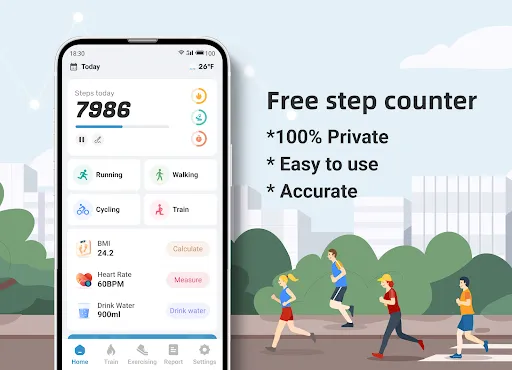
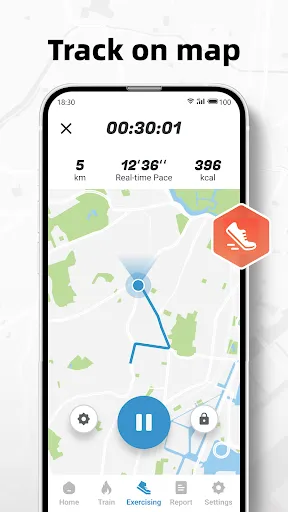
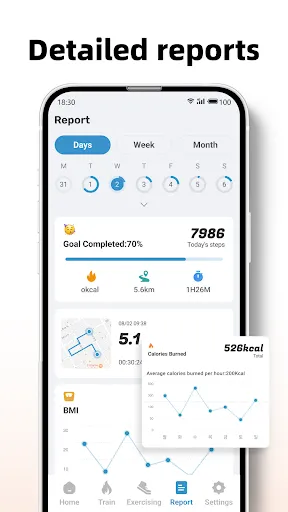
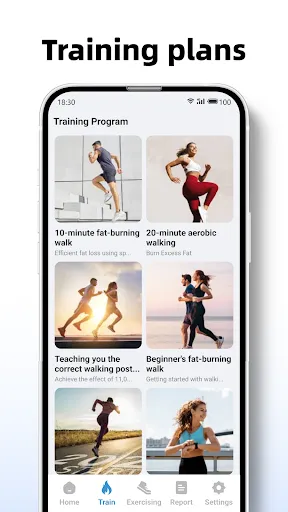
Keep track of your physical activities over time with our detailed activity log. This feature allows you to review your progress, analyze patterns, and make informed decisions on how to improve your fitness routine for better results.
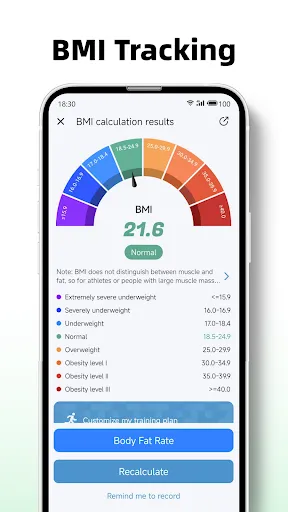
Quickly assess your body mass index with our built-in BMI calculator, which provides insights into your weight status. Simply input your height and weight, and receive instant feedback on whether you're in a healthy range, aiding in your overall wellness journey.
Easily monitor your daily steps with our intuitive step counter that accurately records every move you make. Whether you're walking, jogging, or hiking, you'll have a clear view of your activity levels, helping you stay motivated and reach your fitness goals.
Set personalized fitness goals to stay focused and motivated on your journey. Whether you aim to increase your step count, lose weight, or improve your overall health, our app allows you to customize goals that suit your lifestyle and track your achievements.

 Tracks your daily steps to help you stay active and healthy. Monitors your BMI to give insights into your fitness levels. Encourages goal setting for motivation and improved performance. User-friendly interface makes tracking progress simple and enjoyable. Syncs with other health apps for comprehensive wellness management.
 Limited accuracy in tracking steps can lead to misleading activity data Syncing issues with devices can disrupt user experience Lack of customization options may not meet individual fitness goals
 The Step Counter - Pedometer & BMI app is designed for a variety of users, ranging from casual walkers to fitness enthusiasts. Whether you're taking a leisurely stroll in the park, hiking up a mountain, or engaging in a rigorous workout at the gym, this app serves as a reliable companion. It's particularly beneficial for individuals looking to track their daily activity levels, set fitness goals, or monitor their body mass index (BMI) as part of a broader wellness strategy. Users can easily incorporate the app into their daily routines, making it a versatile tool for anyone aiming to maintain a healthy lifestyle or simply increase their physical activity.
The user experience of the Step Counter - Pedometer & BMI app is generally positive, marked by an intuitive interface that is easy to navigate. Upon launching the app, users are greeted with a clean dashboard displaying essential metrics such as step count, distance traveled, and calories burned. The design is visually appealing, with vibrant colors and simple graphics that enhance usability. One standout feature is the ability to set personalized goals, allowing users to stay motivated and track their progress over time. Feedback from users highlights the app's accuracy in step counting and the seamless integration with devices, ensuring that data is captured effectively. Additionally, the app includes educational resources about health and fitness, which enriches the overall experience.
Updates & Support The developers of the Step Counter - Pedometer & BMI app are committed to continuous improvement, regularly releasing updates that enhance functionality and user experience. Users can expect bug fixes, performance enhancements, and new features based on user feedback. The support system is robust, with a dedicated help section within the app that provides answers to common questions and troubleshooting tips. Users can also reach out to customer support via email for more complex issues. This level of ongoing support and responsiveness from the developers contributes significantly to user satisfaction, reinforcing the app's reputation as a reliable fitness tracking tool.
Security & Privacy Review
 Google Play
  App Store


Been using this since November 2023, it's beautifully simple and to the point. The user interface feels very smooth and intuitive, and it does it's job well! There's lots of little achievements and details that make it fun to pop in and visit just for the sake of it. Along with tracking steps, it also keeps logs of distance (in accordance to your stride length), time spent walking, and calories burned. Even with everything, it barely drains power at all, and dosen't need any wifi to work!
This app started off strong, logging my daily steps, then all of a sudden, it's not tracking or giving subpar stats. It was working fine 4 days ago, and since Friday, it hasn't been much help. Once the issue is figured out and I start actually seeing some consistent results, I'll change my rating.
This app doesn't drain my battery and has fairly quite notifications, so I'm really enjoying using it to keep track of how much I walk at work. The only thing I'd like to change is being allowed to tailor the type of notifications. I enjoy seeing how much I'm actively walking, but I don't really need achievement reminders at all of my step milestones (halfway to my goal, halfway to the next achievement, etc.)
Lovely and accurate. I work in a warehouse and it's great to see how much I'll walk in the busier season. The accuracy is insane as well. I've checked it before and after my commute, using the forklift for some time, etc. and it's only incorrectly increased by a single digit number every time, even when the time period was close to 45-50 minutes before I could look at it again. Inaccuracy lower than 0.1% is incredible to get from this. Better than other paid apps imo
11/22 This app is amazing. It helps me keep track of distance walked as expected but the other features is why I'm giving it a 5 star. The app also offers workouts for just about anyone. And even keeps track of calories burned, water intake, goals, and you can even set your own schedule in the app. Ads are present but at least they're not popping up constantly. Update: It's now 1/25/24 and I still love this app. I've lost 165lbs, gained muscle mass, and now I'm very fit and active. Great app!
Review Source: Google Play store public user reviews.
Yes, users can submit suggestions or feedback through the app's support section or by contacting customer service directly.
The app prioritizes user privacy and does not collect personal data unless explicitly provided for specific features or services.
Yes, Step Counter - Pedometer & BMI can function offline, allowing users to track their steps and activity without needing an internet connection.
You can cancel your subscription through your device's app store settings, following the prompts to manage subscriptions.
Subscription costs vary, but typically, users can choose from monthly or yearly plans, with discounts available for longer commitments.
Yes, you can access customer service directly through the app by navigating to the help section and selecting "Contact Us."
Unfortunately, customer numbers cannot be changed. If you need assistance, please contact customer service for further help.
You can reach our customer service by emailing support
You can reset your password by clicking the "Forgot Password" link on the login page and following the instructions sent to your email.
To activate your account, click on the activation link sent to your email after registration. If you didn’t receive it, check your spam folder or request a new link.
🌟 "Today" Management: Added support for customizing modules (add, remove, and reorder)🌟 Heart Rate Monitoring: Upgraded algorithm for more accurate and reliable results 🌟 Live Step Notifications: Optimized alerts for faster and more responsive updates

Planet Fitness Workouts
Planet Fitness

Finch: Self Care Pet
Finch: Self-Care Pet

Yuka - Food & Cosmetic scanner

Lazy exercise at home

Flo Ovulation & Period Tracker
Flo Period & Pregnancy Tracker

BitePal: Food Tracker Pet
Calm - Sleep, Meditate, Relax
Step Counter - Pedometer

Pedometer - Step Counter