This site uses cookies to enhance your user experience. By clicking any link on this site you are giving your consent to our cookie policy. Read more
Reject
Accept All

Advertiser and Editorial Disclosures

Gospel Library

Gospel Library

verified

The Church of Jesus Christ of Latter-day Saints

4.7
Rating
10,000,000+ Downloads
7.7.1-(771058.3080695) Version
  • category

    Category: Books & Reference

  • price

    Price: free

  • age rating

    Age Rating: Everyone

  • rating

    Rating: 4.7

  • available on

    Available on: /

  • updated on

    Updated on: Jun 30, 2026

Screenshot 1
Screenshot 2
Screenshot 3
Screenshot 4
Screenshot 5
Screenshot 6
Screenshot 7
Advertisement

Features & Highlights

Customizable Study Plans

With Gospel Library, you can create personalized study plans tailored to your spiritual goals and learning pace. The app helps you set reminders and track your progress, making your scripture study more effective and engaging over time.

Extensive Library Collection

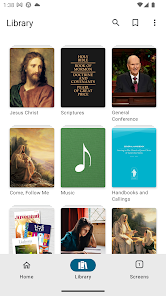
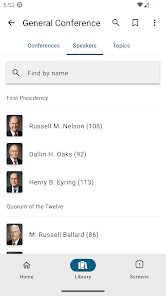
Gospel Library boasts a vast collection of religious texts, including scriptures, church history, and inspirational talks from church leaders. This extensive library ensures that users have access to a wealth of knowledge and resources to deepen their understanding and faith.

Offline Access

Gospel Library allows users to download content for offline reading, ensuring that you can access your favorite scriptures, talks, and church materials anytime, anywhere, without needing an internet connection. This feature is perfect for those moments when you want to immerse yourself in spiritual content without distractions.

User-Friendly Interface

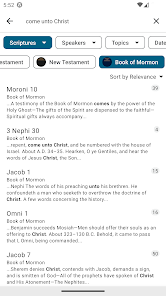
The app features a clean and intuitive interface that makes navigating through scriptures and materials a breeze. With easy search functionality and customizable features, users can quickly find what they need, making their study sessions more enjoyable and productive.

Advertisement

Pros & Cons

Pros
  • Access a vast collection of gospel resources anytime.
  • User-friendly interface makes navigation simple and intuitive.
  • Supports offline access for uninterrupted study anywhere.
  • Regular updates ensure content is current and relevant.
  • Personalization features enhance your learning experience.
Cons
  • Limited offline access for users without internet
  • Search functionality can be cumbersome at times
  • Outdated content may not reflect current teachings
  • Interface can feel cluttered and overwhelming

Real Experience Using Gospel Library

Application Scenarios

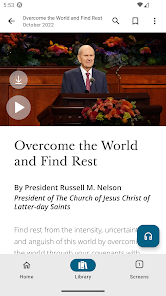
The Gospel Library app serves as a versatile resource for individuals seeking spiritual growth and understanding. It's particularly beneficial for members of The Church of Jesus Christ of Latter-day Saints, but its contents can be valuable to anyone interested in gospel teachings. Users can access scriptures, church manuals, and general conference talks, making it a great companion for personal study, group discussions, and church services. The app is also ideal for those preparing lessons or talks, as it allows for easy organization and referencing of relevant materials. Furthermore, with features like offline access, users can study anywhere, whether at home, in transit, or during quiet moments at work.

User Experience

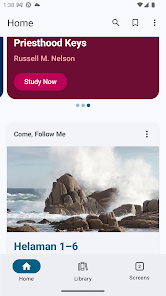
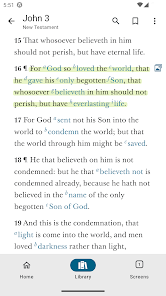
The user experience of the Gospel Library app is generally intuitive and user-friendly. The interface is clean and simple, allowing users to navigate through various sections with ease. The ability to bookmark passages, highlight text, and take notes enhances the study experience, making it personal and interactive. Additionally, the search function is robust, enabling users to locate specific verses or topics quickly. However, some users have reported occasional glitches or lag, particularly when syncing across devices. Despite these minor issues, the overall feedback remains positive, with many appreciating the depth of resources available and the seamless integration of multimedia content, such as videos and audio recordings related to gospel teachings.

Pricing

Updates & Support The Gospel Library app is regularly updated to improve functionality and expand its content. These updates often include new features based on user feedback, ensuring that the app continues to meet the needs of its audience. The support team is also responsive, providing assistance through various channels, including email and online forums. Users can report bugs or suggest improvements, which are taken into consideration for future updates. Overall, the commitment to ongoing development and user support reflects the app's dedication to enhancing the spiritual journey of its users.

verified Security & Privacy Review

The Gospel Library app prioritizes user security and privacy, ensuring that personal data is handled with care. It employs robust encryption protocols to protect user information during transmission, safeguarding sensitive data from unauthorized access. Additionally, the app does not require excessive permissions, which minimizes potential vulnerabilities associated with data access. User data is collected primarily for enhancing the app experience, including personalized content and recommendations. However, the app maintains transparency regarding its data collection practices, as outlined in its privacy policy. Users are encouraged to review this policy to understand what information is collected and how it is utilized. The app provides users with control over their data, allowing them to manage privacy settings and opt out of certain data collection practices. Furthermore, Gospel Library commits to not selling user data to third parties, reinforcing its dedication to user privacy. Overall, the app demonstrates a strong commitment to maintaining the security and privacy of its users while delivering a valuable resource for spiritual growth.
Advertisement

Compare APP

User Reviews

  • Megan
    2025/04/27

    Gospel Library is fantastic and it gets better and better. In the last little bit when reading something and marking it, the highlights jump around and are slightly off (about a half of line) from what should be highlighted. Also at the bottom of the conference talks the tags are over the top of the last paragraph of the talk making it difficult to read. Sometimes if I go out and back in a few times they'll go to the very bottom, but not very often.

  • Bryson Kids
    2025/09/14

    Love this app, helps me to be on my scriptures without the physical ones. It also gives me a bunch of different music, and I love that. But, WHY have a lot of the youth themes been DELETED!? (I wish I could do 4.5 out of 5) I seriously love this app, just the only problem I have is that most of the youth themes have been deleted.

  • Julia D Rodgers
    2026/04/10

    Great app for the scriptures and other church literature. A few years ago, there used to be a series of directional arrow taps I could make on my bluetooth keyboard that would allow my bluetooth keyboard space board or arrow keys to scroll the screen (instead of my finger to swipe on the screen). With an update in recent years, that is gone. I can get my keyboard scrolling ability again if I highlight a word, tap an arrow key, then unhighlight the word. All is well now.

  • Ethan Denton
    2026/02/09

    I love this app. Very Helpful for highlighting passages and taking, notes, and linking scriptures. the only things I don't like are that on my current phone, I have difficulty highlighting specific things, without it jumping down the page. So I have to do it a certain way, which us slowly drag up or down, and THEN to the side, otherwise it jumps all over the place. the other two things are that the search engine is terrible, and I wish there was a time stamp date that did not change in notes.

  • Jonathan Barrus
    2026/03/01

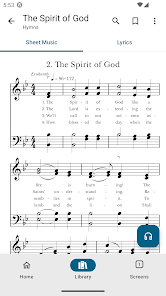
    I love the gospel library app. However, I am concerned that with the addition of the Sacred Music library to the Gospel Library app, some of the Sacred Music app functions are going to be lost, such as the ability to look at music in light screen mode when the rest of the app is in dark mode. Other functions that I would appreciate are the ability to listen to the hymns with different instrumentations, such as just instrumental, or with guitar. Edit: they fixed it! thanks!

Review Source: Google Play store public user reviews.

FAQ

1

Does Gospel Library collect my personal data?

Gospel Library adheres to privacy standards and may collect limited personal data to enhance user experience and functionality, but it does not sell personal data to third parties.

2

Does Gospel Library offer a free trial or free version?

Gospel Library is completely free to download and use, providing access to all of its features and content without any trial or subscription fees.

3

Does Gospel Library require an internet connection?

While Gospel Library can be used offline once content is downloaded, an internet connection is required for initial downloads and updates.

4

How can I contact support or send feedback for Gospel Library?

Users can contact support or send feedback through the app itself by navigating to the settings or help section, where they can find options to reach out to the support team.

5

How do I manage or cancel my Gospel Library subscription?

Since Gospel Library does not require a subscription and is free to use, there is no need to manage or cancel any subscriptions associated with the app.

How to use Gospel Library

1

How can I contact customer service for the Gospel Library app?

You can contact customer service through the app's settings or visit the official website for support options.

2

How do I log in to the Gospel Library app?

Open the app, tap "Sign In," and enter your Church account credentials (email and password).

3

Is there a need to activate the Gospel Library app?

No activation is necessary; simply download the app and log in with your Church account to access features.

4

What is the customer service number for the Gospel Library app?

The customer service number varies by region; please check the app or the official website for your local contact information.

What's New

• Added drag to reorder on Home.• Improved drag to reorder throughout the app.• Fixed a few crashes and stability issues.

Editor's Choice