This site uses cookies to enhance your user experience. By clicking any link on this site you are giving your consent to our cookie policy. Read more
Reject
Accept All

Advertiser and Editorial Disclosures

EA SPORTS™ FC 24 Companion

EA SPORTS™ FC 24 Companion

verified

ELECTRONIC ARTS

3.5
Rating
50,000,000+ Downloads
26.7.0.10789 Version
  • category

    Category: Sports

  • price

    Price: free

  • age rating

    Age Rating: Everyone

  • rating

    Rating: 3.5

  • available on

    Available on: /

  • updated on

    Updated on: Jun 2, 2026

Screenshot 1
Screenshot 2
Screenshot 3
Screenshot 4
Screenshot 5
Screenshot 6
Screenshot 7
Screenshot 8
Screenshot 9
Screenshot 10
Screenshot 11
Screenshot 12
Screenshot 13
Screenshot 14
Screenshot 15
Screenshot 16
Screenshot 17
Screenshot 18
Advertisement

Features & Highlights

FIFA Ultimate Team Management

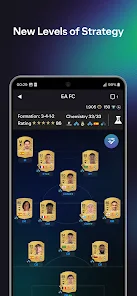
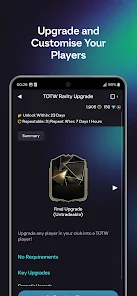
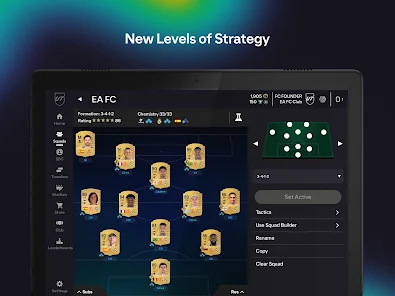
Take control of your FIFA Ultimate Team anytime, anywhere with the EA SPORTS FC™ 26 Companion app. You can manage your squad, adjust formations, and make strategic decisions on the go, ensuring you're always ready for the next big match or challenge.

Notifications and Alerts

Never miss a beat with customizable notifications and alerts for your Ultimate Team. Whether it’s player transfers, market fluctuations, or upcoming events, the Companion app keeps you informed, making it easier to seize opportunities as they arise.

Real-Time Market Updates

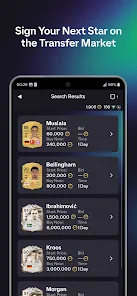
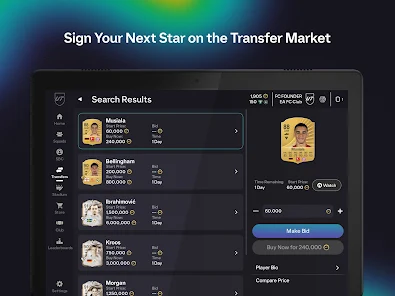
Stay ahead of the competition with real-time updates on player prices and market trends. The Companion app provides valuable insights, helping you make informed decisions on buying and selling players to enhance your Ultimate Team roster.

Squad Building Challenges

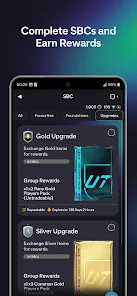
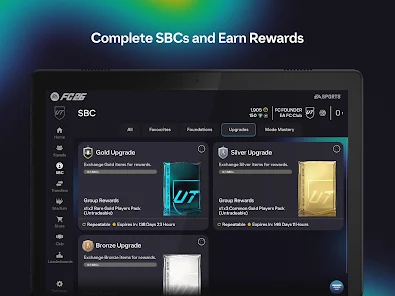
Engage in exciting Squad Building Challenges directly from your mobile device. The app allows you to create unique squads and complete various challenges, providing rewards that can elevate your gameplay experience and keep you motivated throughout the season.

Advertisement

Pros & Cons

Pros
  • Access your FIFA Ultimate Team anytime, anywhere for ultimate flexibility.
  • Manage your squad and transfers on the go with ease.
  • Quickly buy and sell players to enhance your team’s performance.
  • Track your progress and objectives effortlessly from your mobile device.
  • Stay updated with live events and challenges right at your fingertips.
Cons
  • Limited functionality compared to the full game experience can frustrate users.
  • Slow loading times may hinder quick access to features and updates.
  • Inconsistent app performance can lead to a disjointed user experience.

Real Experience Using EA SPORTS™ FC 24 Companion

Real Experience Application Scenarios

The EA SPORTS FC™ 26 Companion app is designed to enhance the gameplay experience of FIFA enthusiasts, particularly those who are deeply invested in Ultimate Team. It serves as a versatile tool allowing users to manage their teams on-the-go. Whether you're commuting, waiting in line, or simply relaxing at home, the app provides seamless access to your squad, enabling you to make quick adjustments, buy, sell, or trade players in the transfer market. Additionally, the app features live updates, allowing players to stay informed about changes in player ratings, team performances, and upcoming events. This real-time information is crucial for making informed decisions when assembling the ideal squad or preparing for upcoming matches.

User Experience

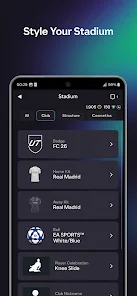
The user interface of the EA SPORTS FC™ 26 Companion app is intuitive and user-friendly, catering to both seasoned players and newcomers alike. Navigating through various sections, from squad management to market transactions, is smooth and engaging. The app employs a visually appealing design that mirrors the main game, offering a familiar experience for users. Moreover, the inclusion of timely notifications ensures that players are always aware of significant events within their Ultimate Team. Community features, such as sharing achievements and squad setups with friends, foster a sense of camaraderie among players. However, some users may experience occasional lag during peak hours, particularly when browsing the transfer market, which can hinder the overall experience.

Pricing

The EA SPORTS FC™ 26 Companion app is free to download and use, making it accessible to all FIFA fans. While the base features are available at no cost, players have the option to purchase in-game items through microtransactions. These purchases can enhance the gaming experience by allowing users to acquire special packs or items that may not be available through regular gameplay. However, it’s worth noting that while these microtransactions can provide advantages, they are not mandatory for enjoying the app or succeeding in Ultimate Team. Players can still achieve great success through strategic gameplay and dedication without spending additional money.

Updates & Support

EA regularly updates the Companion app to ensure it remains aligned with the main game and the evolving needs of the player community. These updates often include bug fixes, performance improvements, and the addition of new features to enhance user engagement. The support team is responsive, providing assistance through various channels, including online forums and social media platforms. Players can report issues, share feedback, and seek help with any challenges they may face while using the app. The commitment to regular updates and player support reflects EA's dedication to maintaining a robust and enjoyable experience for all users of the EA SPORTS FC™ 26 Companion app.

verified Security & Privacy Review

Security & Privacy Review EA SPORTS FC™ 26 Companion prioritizes user security and privacy through robust data protection practices. The app employs encryption to safeguard sensitive information, ensuring that personal data remains confidential during transmission and storage. Users are encouraged to enable two-factor authentication for an additional layer of security. The app requests permissions that are necessary for optimal functionality, such as access to the device's storage and internet connection. However, it is essential for users to review these permissions carefully during installation. EA Sports maintains a transparent privacy policy, outlining how user data is collected, used, and shared. The data collected may include gameplay statistics and user preferences, which are utilized to enhance user experience and app performance. Users can manage their privacy settings within the app, offering control over data sharing preferences. Overall, EA SPORTS FC™ 26 Companion demonstrates a commitment to protecting user data and maintaining transparency in its privacy practices, making it a reliable choice for gamers concerned about security.
Advertisement

User Reviews

  • Ja'far Ndiaye
    2023/11/13

    The companion app is very convenient for making BASIC changes to your club, but the app has many bugs, the main one being the issue with the bidding process in the transfer market. You can only bid a couple of times before the glitch kicks in, and you have to restart the whole app just for it to happen again. This could be an amazing app, but it definitely needs some work, especially considering that these same glitches, particularly with transfers and trading have been around for several years.

  • Connor Tepley
    2020/10/08

    Its definately not what it could be. It has lots of glitches and errors that occur for no reason. An example is when you try to build a new squad on the app it doesn't save it, or only saves one player. If you don't have access to your gaming platform you're screwed because it wont let you transfer players you have in the squad, or put them into squad building challenges. You can't even quick sell them without an error showing up telling you that "an error has occured"

  • Harsh Saini
    2020/10/12

    Two big problems I'm facing with this app. 1. Search options with a max bid price set, gives less items than available on the market. There is a bug that doesn't let you see all the items below that bid price. 2. Application keeps saying bid has changed, bid prices will be updated and locks you out from making bids or buying out the items.

  • A Google user
    2019/10/18

    I'm having issues customising my Squad. I love the daily rewards & the quick access to the FUT Market. It's very user friendly. HOWEVER, even on the Mobile Companion, your (EA Sports FIFA) servers ARE GARBAGE! The same server connectivity issues that I have for PS4 in FUT is exactly what I'm getting while using Mobile Companion. I know the devs are working around the clock. I recognise their due diligence & technical skills but they MUST DO SOMETHING about these continuous server kicks

  • A Google user
    2018/10/02

    Same glitches that were a problem past year persist. Bid button randomly stops working ALL THE TIME with no warning. On occassion, a simple restart of the app will fix this (tho you're certainly losing w/e you were bidding on since it takes at least 30 secs to load) but other times, uninstalling and reinstalling the app to clear this results in nothing. Obviously, it's a great extension of the game itself. But there's a lot of stuff that still pops up, and it doesnt appear to be getting fixed.

Review Source: Google Play store public user reviews.

FAQ

1

Can I submit suggestions or feedback to EA SPORTS™ FIFA 23 Companion?

Yes, users can submit suggestions or feedback through the app’s support section or via EA's official channels, allowing players to share their thoughts and experiences.

2

Does EA SPORTS™ FIFA 23 Companion collect my personal data?

Yes, EA SPORTS™ FIFA 23 Companion collects personal data as part of its functionality, including account information and usage data, in accordance with EA’s privacy policy.

3

Does EA SPORTS™ FIFA 23 Companion support offline use?

No, EA SPORTS™ FIFA 23 Companion requires an internet connection to access its features and manage your Ultimate Team effectively.

4

How do I cancel my EA SPORTS™ FIFA 23 Companion subscription?

Since EA SPORTS™ FIFA 23 Companion does not have a subscription model, there is no need to cancel a subscription. However, users can stop using the app at any time.

5

How much does a subscription to EA SPORTS™ FIFA 23 Companion cost?

EA SPORTS™ FIFA 23 Companion does not require a subscription fee; it is free to use, although certain in-app purchases may be available.

How to use EA SPORTS™ FC 24 Companion

1

Can I change my login details for EA SPORTS FC™ 26 Companion?

Yes, you can change your login details in the account settings of the app.

2

How can I check my account activation status?

You can check your account activation status by logging in to the EA SPORTS FC™ 26 Companion app or contacting customer service.

3

How do I activate my EA SPORTS FC™ 26 Companion account?

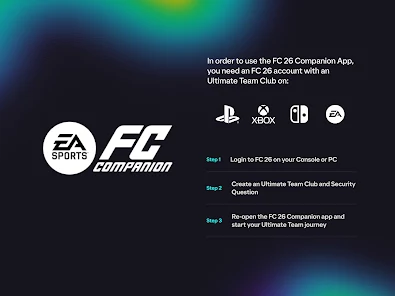
To activate your account, follow the link sent to your email during registration. If you didn't receive it, check your spam folder or contact support.

4

How do I contact customer service for EA SPORTS FC™ 26 Companion?

You can reach customer service through the EA Help website or via the in-app support feature.

5

How do I recover my account if I can't log in?

To recover your account, use the "Forgot Password" option on the login screen or contact customer service for further assistance.

What's New

We’re continuing to make improvements to the Companion App. In this patch we:- Fixed an unresponsive button when claiming Rivals rewards.- Added a back arrow when accessing Evos on landscape devices.- Expired Evo slots no longer hidden if there are unclaimed rewards.- Fixed the locked team filter for Squad Builder in SBCs.- Fixed sorting options for players in Evos.- The Companion Team

Editor's Choice